
If you are looking for a practical way to use Gemma 4 in Java, this project is a strong place to begin. It shows how to connect a Java application to a powerful generative AI model, keep conversation history, stream responses in real time, and build a modern chatbot experience—without heavy frameworks.
This guide is designed for developers searching for:
- Gemma 4 Java tutorial
- Gemma 4 with Maven
- how to use Gemma 4 in Java
- Google GenAI Java SDK example
- build AI chatbot in Java
Table of Contents
📌 What You’ll Learn
- What Gemma 4 is and why it matters
- Why Java is a strong choice for AI
- Maven dependencies used
- Full source code structure
- Streaming chat implementation
- Conversation history handling
- Running the project locally
- Extending into real applications
💡 Why Gemma 4 Is Interesting for Java Developers
Gemma 4 gives access to a powerful modern model that integrates directly into real-world applications.
With Java, this unlocks:
- AI-powered assistants
- Enterprise chatbots
- Documentation tools
- Code helpers
- Support systems
- Research assistants
Instead of Python-only workflows, this brings AI into enterprise-ready Java ecosystems.
🛠️ What This Project Builds
This project creates a terminal-based AI chatbot using:
String model = "gemma-4-31b-it";
Features included:
- Interactive console input
- Real-time streaming output
- Conversation memory
- Command handling
- API key via
.env - Optional Google Search tool
👉 This is not just a demo—it’s a real chatbot architecture.
⚙️ Why Use Java for Gemma 4?
Java is still one of the best choices for production AI systems:
- Stable and scalable
- Strong ecosystem (APIs, DBs, queues)
- Maven dependency management
- Clean architecture
- Easy enterprise integration
If you’re already using Java → no need to switch to Python.
📦 Maven Dependencies
Paste this inside your pom.xml:
<dependencies>

<!-- Google GenAI SDK -->
<dependency>
  <groupId>com.google.genai</groupId>
  <artifactId>google-genai</artifactId>
  <version>1.10.0</version>
</dependency>

<!-- Guava -->
<dependency>
  <groupId>com.google.guava</groupId>
  <artifactId>guava</artifactId>
  <version>33.4.0-jre</version>
</dependency>

<!-- Gson -->
<dependency>
  <groupId>com.google.code.gson</groupId>
  <artifactId>gson</artifactId>
  <version>2.11.0</version>
</dependency>

<!-- DotEnv -->
<dependency>
  <groupId>io.github.cdimascio</groupId>
  <artifactId>dotenv-java</artifactId>
  <version>3.2.0</version>
</dependency>

</dependencies>
🔍 What Each Dependency Does
1. google-genai
Main SDK → connects Java to Gemma 4
2. guava
Used for clean immutable data structures
3. gson
Handles JSON (useful for AI responses)
4. dotenv-java
Loads API keys securely from .env
▶️ Maven Run Plugin
<build>
  <plugins>
    <plugin>
      <groupId>org.codehaus.mojo</groupId>
      <artifactId>exec-maven-plugin</artifactId>
      <version>3.5.0</version>
      <configuration>
        <mainClass>com.gangforcode.Main</mainClass>
      </configuration>
    </plugin>
  </plugins>
</build>
☕ Java Version
<properties>
  <maven.compiler.source>21</maven.compiler.source>
  <maven.compiler.target>21</maven.compiler.target>
</properties>
👉 Uses Java 21 (modern + recommended)
🔐 Environment Setup
Create a .env file:
GEMINI_API_KEY=your_api_key_here
✔ Keeps secrets safe
✔ Works in dev + production
🧠 Core Concepts in Code
API Key Loading
Dotenv dotenv = Dotenv.configure().load();
String apiKey = dotenv.get("GEMINI_API_KEY");
Client Initialization
Client client = Client.builder().apiKey(apiKey).build();
Model Selection
String model = "gemma-4-31b-it";
Streaming Responses
client.models.generateContentStream(...)
👉 Output appears live (like ChatGPT typing)
Chat Memory
List<Content> chatHistory = new ArrayList<>();
👉 Enables context-aware conversations
Complete Java Code (Main.Java)
package com.gangforcode;

import com.google.common.collect.ImmutableList;
import com.google.genai.Client;
import com.google.genai.ResponseStream;
import com.google.genai.types.*;
import io.github.cdimascio.dotenv.Dotenv;

import java.time.LocalDateTime;
import java.time.format.DateTimeFormatter;
import java.util.ArrayList;
import java.util.List;
import java.util.Scanner;

public class Main {

    private static final String PROMPT_PREFIX = "\n\033[34mYou\033[0m> ";
    private static final String TYPING_INDICATOR = "\033[90mGemini is thinking...\033[0m\n";
    private static final String ASSISTANT_PREFIX = "\033[32mGemini\033[0m> ";
    private static final String ERROR_PREFIX = "\033[31m[ERROR]\033[0m ";
    private static final String INFO_PREFIX = "\033[36m[INFO]\033[0m ";
    private static final String SUCCESS_PREFIX = "\033[32m[OK]\033[0m ";

    private static int messageCount = 0;
    private static final DateTimeFormatter timeFormatter = DateTimeFormatter.ofPattern("HH:mm:ss");

    public static void main(String[] args) {
        // Load environment variables from .env file
        Dotenv dotenv = Dotenv.configure()
                .directory(System.getProperty("user.dir"))
                .ignoreIfMissing()
                .load();

        String apiKey = dotenv.get("GEMINI_API_KEY");
        if (apiKey == null || apiKey.isEmpty()) {
            apiKey = System.getenv("GEMINI_API_KEY");
        }

        if (apiKey == null || apiKey.isEmpty()) {
            System.err.println(ERROR_PREFIX + "GEMINI_API_KEY is not set in .env file or environment variables.");
            System.exit(1);
        }

        Client client = Client.builder().apiKey(apiKey).build();
        String model = "gemma-4-31b-it";

        List<Tool> tools = new ArrayList<>();
        tools.add(
            Tool.builder()
                .googleSearch(
                    GoogleSearch.builder().build()
                )
                .build()
        );

        GenerateContentConfig config =
            GenerateContentConfig
                .builder()
                .tools(tools)
                .build();

        // Maintain conversation history
        List<Content> chatHistory = new ArrayList<>();

        Scanner scanner = new Scanner(System.in);

        // Display welcome message
        displayWelcome();

        while (true) {
            System.out.print(PROMPT_PREFIX);
            String userInput = scanner.nextLine().trim();

            if (userInput.isEmpty()) {
                continue;
            }

            // Handle special commands
            if (handleCommand(userInput, chatHistory)) {
                continue;
            }

            // Regular chat message
            messageCount++;

            // Build user content for this turn
            Content userContent = Content.builder()
                    .role("user")
                    .parts(ImmutableList.of(Part.fromText(userInput)))
                    .build();

            // Add to history
            chatHistory.add(userContent);

            System.out.print(TYPING_INDICATOR);
            System.out.print(ASSISTANT_PREFIX);

            try {
                ResponseStream<GenerateContentResponse> responseStream = client.models.generateContentStream(model, chatHistory, config);

                StringBuilder fullResponse = new StringBuilder();
                boolean hasContent = false;

                for (GenerateContentResponse res : responseStream) {
                    if (res.candidates().isEmpty() || res.candidates().get().get(0).content().isEmpty() || res.candidates().get().get(0).content().get().parts().isEmpty()) {
                        continue;
                    }

                    List<Part> parts = res.candidates().get().get(0).content().get().parts().get();
                    for (Part part : parts) {
                        var textObj = part.text();
                        String text = (textObj != null && textObj.isPresent()) ? textObj.get() : null;
                        if (text != null && !text.isEmpty()) {
                            System.out.print(text);
                            fullResponse.append(text);
                            hasContent = true;
                        }
                    }
                }

                responseStream.close();

                if (hasContent && fullResponse.length() > 0) {
                    // Add assistant response to history
                    Content assistantContent = Content.builder()
                            .role("model")
                            .parts(ImmutableList.of(Part.fromText(fullResponse.toString())))
                            .build();
                    chatHistory.add(assistantContent);
                } else {
                    System.out.print("\033[90m(No response available)\033[0m");
                }

                System.out.println();

            } catch (Exception e) {
                System.out.println("\n" + ERROR_PREFIX + e.getMessage());
            }
        }
    }

    /**
     * Display welcome banner and instructions
     */
    private static void displayWelcome() {
        System.out.println("\033[1;36m╔═══════════════════════════════════════════════════════════╗");
        System.out.println("║       Gemini AI - Fully Interactive Terminal Chatbot       ║");
        System.out.println("║            Powered by Google Generative AI                ║");
        System.out.println("╚═══════════════════════════════════════════════════════════╝\033[0m");
        System.out.println();
        System.out.println("\033[1;33mCommands:\033[0m");
        System.out.println("  \033[1m/help\033[0m         - Show this help message");
        System.out.println("  \033[1m/clear\033[0m        - Clear conversation history");
        System.out.println("  \033[1m/stats\033[0m        - Show conversation statistics");
        System.out.println("  \033[1m/history\033[0m      - Show conversation history summary");
        System.out.println("  \033[1m/exit or /quit\033[0m - Exit the chatbot");
        System.out.println();
        System.out.println("\033[90mStarting interactive session...\033[0m");
        System.out.println();
    }

    /**
     * Handle special commands
     * @return true if a command was handled, false otherwise
     */
    private static boolean handleCommand(String input, List<Content> chatHistory) {
        String command = input.toLowerCase();

        if (command.equals("/exit") || command.equals("/quit")) {
            System.out.println("\033[1;33m👋 Goodbye! Thank you for chatting with Gemini AI.\033[0m");
            System.exit(0);
            return true;
        }

        if (command.equals("/clear")) {
            chatHistory.clear();
            messageCount = 0;
            System.out.println(SUCCESS_PREFIX + "\033[90mConversation cleared. Ready for new chat!\033[0m");
            return true;
        }

        if (command.equals("/help")) {
            displayWelcome();
            return true;
        }

        if (command.equals("/stats")) {
            displayStats(chatHistory);
            return true;
        }

        if (command.equals("/history")) {
            displayHistorySummary(chatHistory);
            return true;
        }

        return false;
    }

    /**
     * Display conversation statistics
     */
    private static void displayStats(List<Content> chatHistory) {
        System.out.println("\n" + INFO_PREFIX + "\033[1mConversation Statistics\033[0m");
        System.out.println("  Total Messages: " + (messageCount > 0 ? messageCount : 0));
        System.out.println("  Total Exchanges: " + (chatHistory.size() / 2));
        System.out.println("  User Messages: " + countMessagesByRole(chatHistory, "user"));
        System.out.println("  Assistant Messages: " + countMessagesByRole(chatHistory, "model"));
        System.out.println("  Current Time: " + LocalDateTime.now().format(timeFormatter));
        System.out.println();
    }

    /**
     * Display conversation history summary
     */
    private static void displayHistorySummary(List<Content> chatHistory) {
        if (chatHistory.isEmpty()) {
            System.out.println(INFO_PREFIX + "\033[90mNo conversation history yet.\033[0m\n");
            return;
        }

        System.out.println("\n" + INFO_PREFIX + "\033[1mConversation History\033[0m");
        int count = 1;
        try {
            for (Content content : chatHistory) {
                String role = content.role().orElse("unknown");
                String roleDisplay = role.equals("user") ? "\033[34m[You]\033[0m" : "\033[32m[Gemini]\033[0m";
                System.out.println("  " + count++ + ". " + roleDisplay + " (message)");
            }
        } catch (Exception e) {
            System.out.println(INFO_PREFIX + "Could not display full history: " + e.getMessage());
        }
        System.out.println();
    }

    /**
     * Count messages by role
     */
    private static int countMessagesByRole(List<Content> chatHistory, String role) {
        return (int) chatHistory.stream()
                .filter(content -> content.role().orElse("unknown").equals(role))
                .count();
    }
}
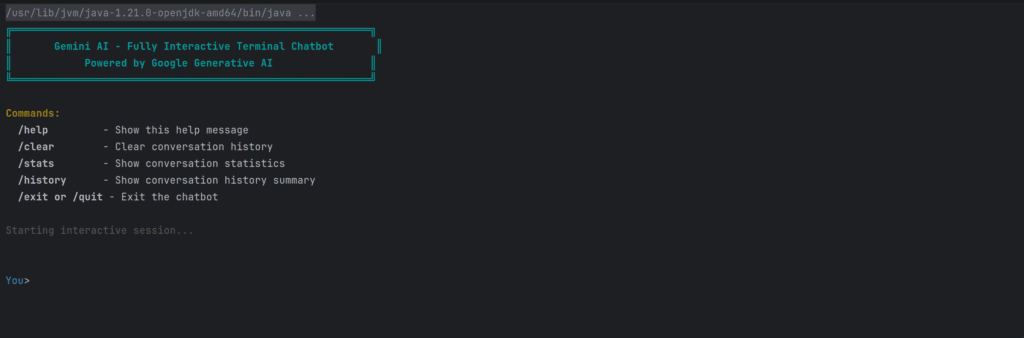
💬 Commands Supported
/help→ show commands/clear→ reset chat/stats→ conversation stats/history→ summary/exit→ quit
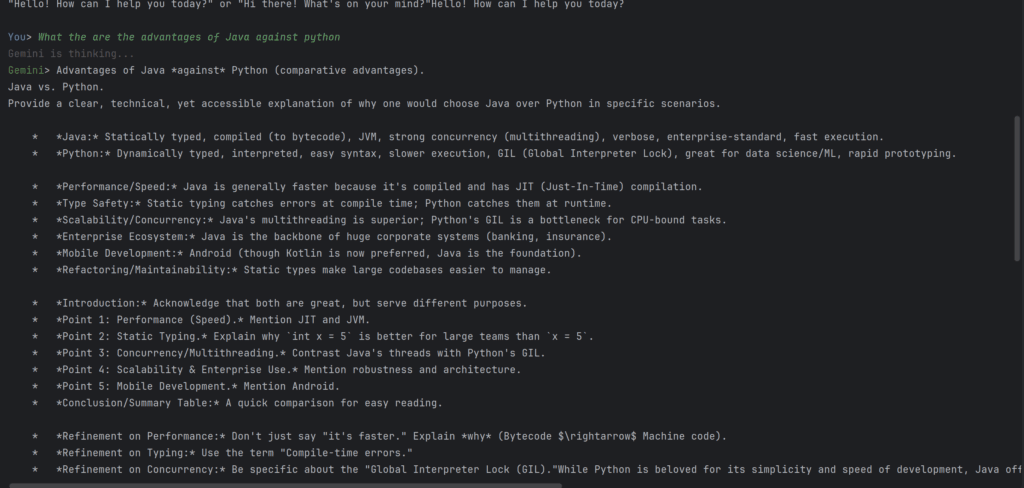
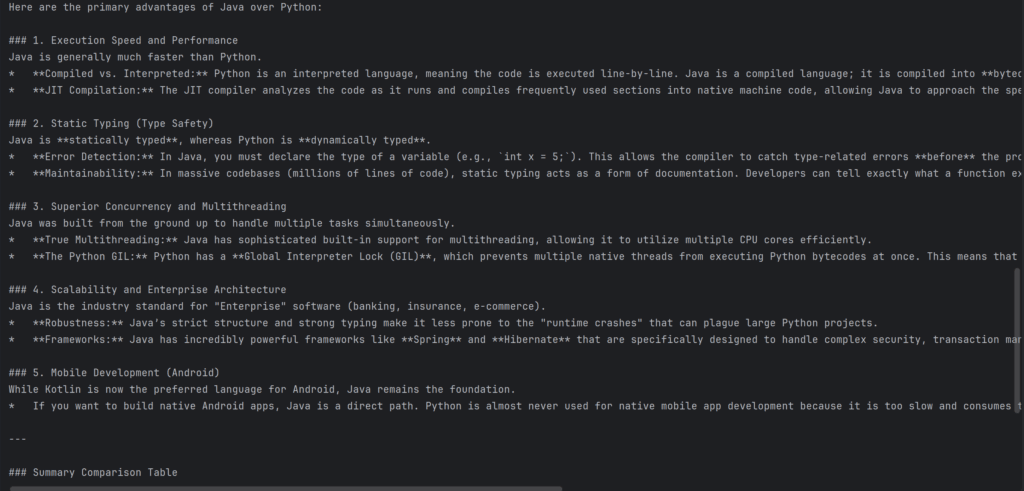
▶️ How to Run
mvn compile exec:java
Or you can directly compile and run Main.java file

🔥 Why This Project Matters
This project demonstrates real-world AI patterns:
- Secure config handling
- Model usage
- Streaming UX
- Stateful chat
- Clean architecture
👉 It’s a production-ready foundation
🚀 How You Can Extend It
Turn this into:
- Spring Boot API
- Web chatbot (Next.js frontend 👀)
- Desktop app
- Internal company assistant
- Multi-tool AI agent
🎯 Takeaway
This project proves:
- Gemma 4 works in Java
- Maven setup is simple
- Streaming is possible
- Chat memory works
- You can build real AI apps
❓ FAQ
Can I use Gemma 4 in Java?
Yes, via Google GenAI SDK.
What dependency is required?
com.google.genai:google-genai:1.10.0
Is Java good for AI chatbots?
Yes—especially for backend + enterprise systems.
Does it support streaming?
Yes, using generateContentStream().
Can I build a web app from this?
Yes—use it as backend for:
- Spring Boot
- Next.js
- Desktop UI