
Artificial Intelligence is no longer limited to Python ecosystems. With LangChain4j, Java developers can integrate modern LLMs cleanly and professionally. In this tutorial, we’ll build an interactive AI console using Google Gemini — specifically the fast and efficient Gemini 2.5 Flash model.
By the end of this guide, you will have:
- A Maven-based Java 17 project
- Secure API key management using
.env - A clean service-layer architecture
- Integration with LangChain4j 1.11.0
- An interactive CLI AI assistant
Table of Contents
What is LangChain4j?
LangChain4j is a Java-native framework designed to make integrating Large Language Models (LLMs) into Java applications simple, structured, and production-ready. Inspired by the LangChain ecosystem in Python, LangChain4j brings similar capabilities to the Java world while preserving strong typing, clean architecture principles, and enterprise-level reliability.
At its core, LangChain4j provides abstractions that eliminate the need to write raw HTTP calls to AI providers. Instead of manually handling API requests and responses, developers interact with well-defined interfaces such as ChatModel, message objects like UserMessage, and service-based abstractions. This allows AI functionality to integrate seamlessly into existing Java applications using familiar design patterns.
One of the biggest advantages of LangChain4j is its provider flexibility. It supports multiple AI providers, including Google Gemini and OpenAI, allowing developers to switch models without rewriting business logic. By programming against interfaces rather than specific implementations, applications remain modular and future-proof.
Beyond basic text generation, LangChain4j also supports advanced AI capabilities such as:
- Multi-turn chat conversations
- Structured outputs
- Tool calling
- Memory management
- Retrieval-Augmented Generation (RAG)
- Embeddings and vector database integrations
Because of this, LangChain4j is not just a wrapper around an AI API — it is a complete framework for building AI-powered systems in Java.
In short, LangChain4j empowers Java developers to build modern AI applications using clean architecture, type safety, and scalable design — making AI integration feel like a natural extension of standard Java development practices.
Lets Start Building
📋 Prerequisites
Before starting this tutorial, make sure you have the following tools and setup ready:
1 Java 17 or Higher
This project uses Java 17 features and LangChain4j 1.11.0 requires Java 17+.
You can verify your Java version using:
java -version
If you see Java 17 or later, you’re good to go.
2️Maven Installed
We are using Maven for dependency management.
Check if Maven is installed:
mvn -version
If not installed, download it from the official Maven website and add it to your system PATH.
3️An IDE (Recommended)
You can use:
- IntelliJ IDEA
- VS Code
- Eclipse
Any IDE that supports Maven projects will work.
4️Google Gemini API Key
You need a valid API key to access Google Gemini 2.5 Flash.
Steps:
- Go to Google AI Studio
- Generate an API key
- Store it in a
.envfile in your project root:
GOOGLE_API_KEY=your_real_key_here
⚠️ Never commit your API key to GitHub.
5️Basic Java Knowledge
You should be comfortable with:
- Java classes and interfaces
- Maven dependency management
- Running a Java application
No prior AI experience is required.
Project Architecture
Your final project structure:
com.gangforcode
 ├── config
 │     ├── EnvConfig.java
 │     └── GeminiConfig.java
 │
 ├── service
 │     ├── AiService.java
 │     └── AiServiceImpl.java
 │
 └── Application.java
Each layer has a defined responsibility:
- config → Infrastructure & model configuration
- service → AI interaction logic
- Application → Console interaction
This separation makes your application scalable and production-ready.
Step 1: Maven Setup
Your pom.xml:
<dependency>
    <groupId>dev.langchain4j</groupId>
    <artifactId>langchain4j-google-ai-gemini</artifactId>
    <version>1.11.0</version>
</dependency>

<dependency>
    <groupId>io.github.cdimascio</groupId>
    <artifactId>dotenv-java</artifactId>
    <version>3.0.0</version>
</dependency>
Why These Dependencies?
LangChain4j Gemini Integration
Provides:
GoogleAiGeminiChatModelChatModel- Message-based API (
UserMessage, etc.)
dotenv-java
Loads environment variables from .env securely.
Step 2: Secure API Key Handling
Create a .env file in your project root:
GOOGLE_API_KEY=your_real_key_here
Make sure to add .env to .gitignore.
EnvConfig.java
public class EnvConfig {

    private static final Dotenv dotenv = Dotenv.configure()
        .ignoreIfMissing()
        .load();

    public static String getGoogleApiKey() {
        String key = dotenv.get("GOOGLE_API_KEY");

        if (key == null || key.isBlank()) {
            throw new IllegalStateException(
                "GOOGLE_API_KEY is missing in .env file"
            );
        }

        return key;
    }
}
Why This Matters
- Prevents key leakage
- Ensures fail-fast behavior
- Keeps secrets outside source code
Step 3: Configuring Gemini 2.5 Flash
GeminiConfig.java
public class GeminiConfig {

    public static ChatModel createModel() {

        return GoogleAiGeminiChatModel.builder()
            .apiKey(EnvConfig.getGoogleApiKey())
            .modelName("gemini-2.5-flash")
            .temperature(0.7)
            .timeout(Duration.ofSeconds(30))
            .build();
    }
}
Explanation
modelName("gemini-2.5-flash")→ Fast, production-friendly modeltemperature(0.7)→ Balanced creativitytimeout(30s)→ Production-safe timeout- Returns
ChatModel(provider-agnostic interface)
Step 4: Creating the Service Layer
AiService.java
public interface AiService {
    String ask(String prompt);
}
This abstraction ensures:
- You can switch providers later
- Your application doesn’t depend on Gemini directly
- Clean architecture
AiServiceImpl.java
public class AiServiceImpl implements AiService {

    private final ChatModel model;

    public AiServiceImpl() {
        this.model = GeminiConfig.createModel();
    }

    @Override
    public String ask(String prompt) {

        var response = model.chat(
            UserMessage.from(prompt)
        );

        return response.aiMessage().text();
    }
}
The flow is now:
UserMessage → model.chat(...) → ChatResponse → aiMessage().text()
This enables:
- Multi-turn conversations
- Tool calling
- Memory support
- Structured outputs
Step 5: Interactive Console Application
Application.java
public class Application {

    public static void main(String[] args) {

        AiService aiService = new AiServiceImpl();
        Scanner scanner = new Scanner(System.in);

        System.out.println("=====================================");
        System.out.println("🤖 Gemini AI Interactive Console");
        System.out.println("Type 'exit' to quit.");
        System.out.println("=====================================");

        while (true) {

            System.out.print("\nYou: ");
            String userInput = scanner.nextLine();

            if ("exit".equalsIgnoreCase(userInput.trim())) {
                System.out.println("👋 Exiting... Goodbye!");
                break;
            }

            try {
                String response = aiService.ask(userInput);

                System.out.println("\nAI: ");
                System.out.println(response);

            } catch (Exception e) {
                System.err.println("❌ Error calling Gemini:");
                e.printStackTrace();
            }
        }

        scanner.close();
    }
}
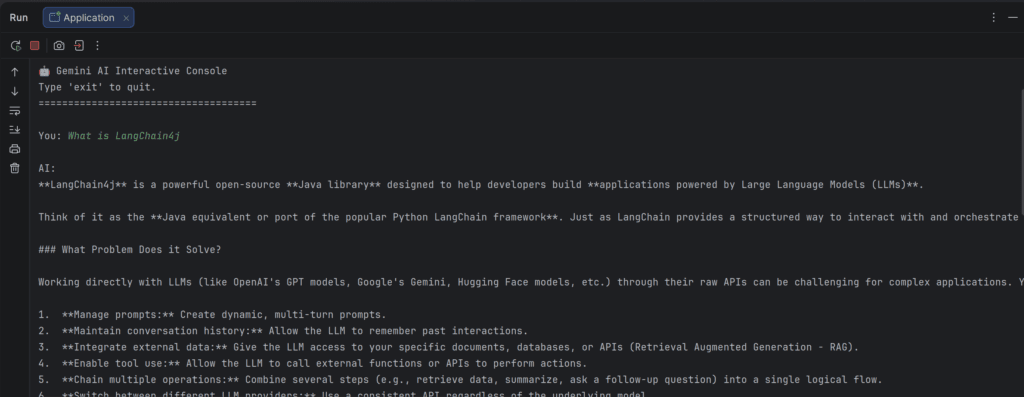
What Happens When You Run It?
🤖 Gemini AI Interactive Console
Type 'exit' to quit.

You: What is Spring Boot?

AI:
Spring Boot is a framework that simplifies Java application development...
Type exit to terminate.
Output
Why This Architecture Is Production-Ready
✔ Environment-based secret management
✔ Provider abstraction via ChatModel
✔ Service layer separation
✔ Timeout configuration
✔ Message-based API (future-proof)
✔ Interactive CLI loop
Common Issues & Fixes
❌ Cannot resolve generate()
LangChain4j 1.x uses chat().
❌ Cannot resolve GeminiChatModel
Correct class is:
GoogleAiGeminiChatModel
❌ API key error
Ensure:
GOOGLE_API_KEY exists in .env
What You Built
You now have:
- A modern Java AI integration
- Clean layered architecture
- Interactive console assistant
- Production-safe configuration
- Gemini 2.5 Flash integration
This is no longer a demo — this is a professional foundation.
Next Steps
From here, you can upgrade to:
- Spring Boot REST API
- Add conversation memory
- Implement RAG (Retrieval Augmented Generation)
- Add structured JSON output
- Add logging & retry mechanisms
- Build an AI-powered interview platform
Final Thoughts
With LangChain4j 1.11.0 and Gemini 2.5 Flash, Java developers can now build AI-powered systems without messy HTTP calls or unsafe key handling.
You’ve built a clean, scalable AI integration using:
- Proper configuration
- Modern message-based API
- Clean architecture principles