
If you are completely new to programming, OOPS (Object-Oriented Programming System) might feel difficult in the beginning. But once you understand the basic idea, it becomes one of the easiest and most useful concepts in programming.
In this tutorial, you will learn OOPS from scratch with simple explanations and beginner-friendly examples.
- What is OOPS?
- Class and Object (First Step in OOPS)
- Example of Class and Object in Java
- Why is OOPS Important?
- Four Main Concepts of OOPS
- 1. Encapsulation (Data Protection)
- 2. Abstraction (Hide Unnecessary Details)
- 3. Inheritance (Code Reuse)
- 4. Polymorphism (One Name, Many Forms)
- Summary of OOPS Concepts
- Simple Mini Project Example (Student Class)
- Final Notes for Beginners
- See Also
What is OOPS?
OOPS stands for Object-Oriented Programming System.
It is a programming style where we build software by thinking in terms of real-world objects.
Real-world Example
Think about a Car.

A car has:
- Properties (data): brand, color, speed
- Actions (behavior): start(), stop(), accelerate()
In OOPS, we create the same structure using classes and objects.
Class and Object (First Step in OOPS)
What is a Class?
A class is a blueprint or template used to create objects.
Example:
A class is like the design of a car on paper.
What is an Object?
An object is a real entity created from a class.
Example:
The real car that runs on the road is an object.
Example of Class and Object in Java
class Car {
    String brand = "Honda";
    int speed = 60;

    void start() {
        System.out.println("Car is starting...");
    }
}

public class Main {
    public static void main(String[] args) {
        Car c1 = new Car(); // object created
        c1.start();
        System.out.println(c1.brand);
        System.out.println(c1.speed);
    }
}
Output:
Car is starting...
Honda
60
Why is OOPS Important?
OOPS is useful because it makes your program:
- easier to understand
- easier to manage
- reusable
- structured and scalable for real projects
Four Main Concepts of OOPS
OOPS is mainly based on these four concepts:
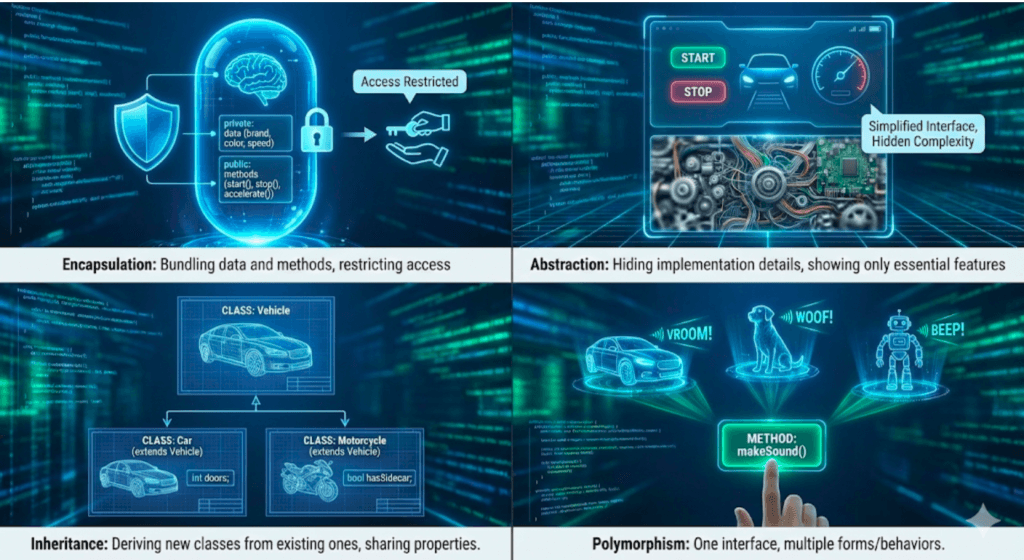
- Encapsulation
- Abstraction
- Inheritance
- Polymorphism
Let’s understand them one by one.
1. Encapsulation (Data Protection)
Meaning
Encapsulation means combining data and methods into one unit (class), and protecting the data from outside access.
We usually do this by using access modifiers like private, public, etc.
Real-world Example
An ATM machine shows you only the options like withdraw and check balance. It does not show the internal logic.
Java Example: Encapsulation
class BankAccount {
    private int balance = 1000;

    public int getBalance() {
        return balance;
    }

    public void deposit(int amount) {
        balance = balance + amount;
    }
}

public class Main {
    public static void main(String[] args) {
        BankAccount acc = new BankAccount();

        System.out.println(acc.getBalance());
        acc.deposit(500);

        System.out.println(acc.getBalance());
    }
}
Output:
1000
1500
In this example, balance is private, so it cannot be accessed directly outside the class. We can only access it using methods like getBalance().
2. Abstraction (Hide Unnecessary Details)
Meaning
Abstraction means hiding internal implementation details and showing only the important features.
Real-world Example
When you use a mobile phone, you press the call button. You don’t need to know how signals work internally.
Java Example: Abstraction (Using Abstract Class)
abstract class Animal {
    abstract void sound();
}

class Dog extends Animal {
    void sound() {
        System.out.println("Dog barks");
    }
}

public class Main {
    public static void main(String[] args) {
        Animal a = new Dog();
        a.sound();
    }
}
Output:
Dog barks
Here, the user only knows the animal can make a sound. The internal details are hidden.
3. Inheritance (Code Reuse)
Meaning
Inheritance means one class can reuse the properties and methods of another class.
The existing class is called the parent class (or base class).
The new class is called the child class (or derived class).
Real-world Example
A child inherits characteristics from parents like surname or habits.
Java Example: Inheritance
class Vehicle {
    void start() {
        System.out.println("Vehicle is starting...");
    }
}

class Bike extends Vehicle {
    void run() {
        System.out.println("Bike is running...");
    }
}

public class Main {
    public static void main(String[] args) {
        Bike b = new Bike();
        b.start();
        b.run();
    }
}
Output:
Vehicle is starting...
Bike is running...
Here, Bike class reused the start() method from Vehicle.
4. Polymorphism (One Name, Many Forms)
Meaning
Polymorphism means the same method name can behave differently depending on the object.
Real-world Example
A person can be a student in school and an employee in an office. The same person plays different roles.
Java Example: Polymorphism (Method Overriding)
class Animal {
    void sound() {
        System.out.println("Animal makes sound");
    }
}

class Cat extends Animal {
    void sound() {
        System.out.println("Cat meows");
    }
}

public class Main {
    public static void main(String[] args) {
        Animal a = new Cat();
        a.sound();
    }
}
Output:
Cat meows
Here, the method sound() works differently for different classes.
Summary of OOPS Concepts
| Concept | Meaning | Simple Example |
|---|---|---|
| Class | Blueprint | Car design |
| Object | Real entity | Real car |
| Encapsulation | Protect data | private variables |
| Abstraction | Hide implementation | Call button |
| Inheritance | Reuse code | Bike extends Vehicle |
| Polymorphism | Same method, different behavior | sound() in Dog/Cat |
Simple Mini Project Example (Student Class)
This example uses class, object, and constructor:
class Student {
    String name;
    int age;

    Student(String name, int age) {
        this.name = name;
        this.age = age;
    }

    void display() {
        System.out.println("Name: " + name);
        System.out.println("Age: " + age);
    }
}

public class Main {
    public static void main(String[] args) {
        Student s1 = new Student("Gil", 22);
        s1.display();
    }
}
Output:
Name: Gil
Age: 22
Final Notes for Beginners
If you are learning OOPS for the first time, focus on this order:
- Class and Object
- Encapsulation
- Inheritance
- Polymorphism
- Abstraction
Once you understand these, you can easily learn advanced topics like interfaces, constructors, method overloading, and design patterns.
See Also

Code is for execution, not just conversation. I focus on building software that is as efficient as it is logical. At Ganforcode, I deconstruct complex stacks into clean, scalable solutions for developers who care about stability. While others ship bugs, I document the path to 100% uptime and zero-error logic