

Want to use Claude Code without paying anything?

Here’s the truth:
Claude Code itself isn’t free when used with official APIs—but there’s a powerful workaround.
By combining it with Ollama, you can run:
- Local AI models on your machine
- Free cloud models with zero setup
- Even large models without managing infrastructure
In this guide, you’ll learn how to use Claude Code free with ollama
Table of Contents
What is Claude Code?
Claude Code is an agentic terminal-based AI developer that can:
- Read and modify your codebase
- Execute commands
- Automate development workflows
Think of it as a junior dev inside your terminal.
What is Ollama?
Ollama lets you:
- Run LLMs locally
- Use cloud-hosted models with same CLI
- Connect tools like Claude Code without API complexity
👉 Key feature: same command works for both local & cloud models
LLM you can use with Claude Code free
Local Models (Free + Offline)
qwen3.5(~11GB)glm-4.7-flash(~25GB)- And many more …
👉 These run fully on your system
Example:
ollama pull qwen3.5
ollama launch claude --model qwen3.5
👉 Best for:
- Privacy
- No internet dependency
- Zero cost
Free Cloud Models (No API Setup)
qwen3.5:cloudkimi-k2.5:cloudglm-5:cloudminimax-m2.7:cloud
👉 These run on cloud but use same Ollama CLI
Example:
ollama launch claude --model qwen3.5:cloud

👉 Important:
- No API key needed
- Some free usage limits may apply
Large Models (High Performance)
Example:
- qwen3.5:cloud -> Reasoning, coding, and Agentic tool use with vision
- glm-5:cloud – >Reasoning and code generation
- minimax-m2.7:cloud ->Fast, efficient coding and real-world productivity
👉 These models are:
- More accurate
- Better at complex coding
- Slightly slower (depending on hardware)
Claude Code Free Setup (Quick & Clean)
1. Install Ollama
curl -fsSL https://ollama.com/install.sh | sh
2. Install Claude Code
curl -fsSL https://claude.ai/install.sh | bash
3. Run Directly (No Config Needed)
👉 Easiest way:
ollama launch claude
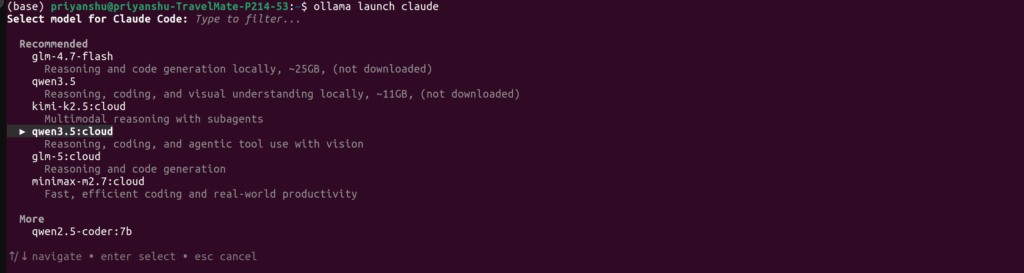
👉 With specific model:
ollama launch claude --model qwen3.5
👉 Or cloud:
ollama launch claude --model kimi-k2.5:cloud
How Model Selection Works
When you open Claude Code:
- It shows recommended models
- You can filter by typing
- Use arrow keys + enter
Exactly like your screenshot 👇
👉 Recommended models include:
kimi-k2.5:cloudglm-5:cloudqwen3.5glm-4.7-flash(Ollama Docs)
Real Usage Examples
Inside Claude Code:
> build a REST API in FastAPI
> refactor this project for performance
> debug why this function is failing
Best Model Strategy (Important)
Low-End PC (8–16GB RAM)
👉 Use:
qwen2.5-coder:7b
Mid System (16–32GB RAM)
👉 Use:
qwen3.5glm-4.7-flash(quantized)
No Hardware Limit
👉 Use cloud:
kimi-k2.5:cloud- glm-5:cloud
- qwen3.5:cloud
minimax-m2.7:cloud
⚡ Pro Tips
- Use local models for daily coding
- Use cloud models for heavy tasks
- Combine both for best workflow
- Always run inside project folder
🚨 Common Mistakes
❌ Thinking cloud = paid (has rate limit)
👉 Many models are free to try
❌ Downloading huge model without RAM
👉 Check size before pulling
❌ Using small model for complex tasks
👉 Switch to cloud when needed
Final Thoughts
Claude Code + Ollama is one of the most powerful free AI setups today.
You get:
- 🧠 Local AI coding assistant
- ☁️ Free cloud models
- 🚀 Large model access
- 💸 No API cost