
Understanding how to find the length of array in C is one of the first and most important concepts every C programmer must master. Unlike modern languages, C does not store array size automatically, which often confuses beginners and even causes bugs in real-world programs.
In this tutorial, you’ll learn all practical ways to find the length of an array in C, with clear explanations, real examples, and best practices—optimized for learning and Google Discover readability.
Why Finding Array Length in C Is Tricky
To understand why finding the length of an array in C works in some cases and fails in others, it’s important to see how arrays are actually stored in memory. The following diagram shows how a C array occupies contiguous memory locations starting from a base address.
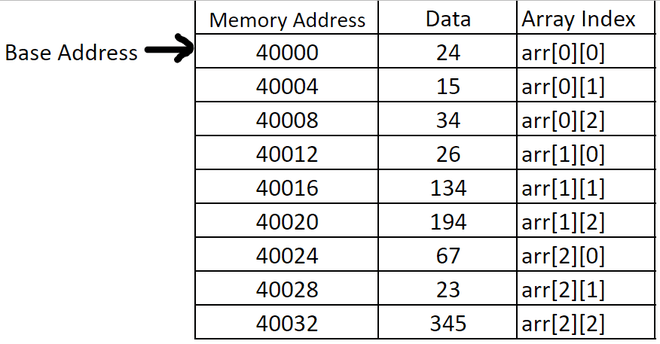
C arrays are simple memory blocks. Once an array is passed to a function, it decays into a pointer, and its size information is lost. That’s why understanding array length calculation is critical for:
- Avoiding buffer overflows
- Writing safe loops
- Building efficient C programs
- Cracking C interviews
Method 1: Using sizeof() Operator (Most Common Way)
The sizeof operator is the safest and fastest way to find the length of an array inside the same scope where it is declared.
Example
#include <stdio.h>

int main() {
    int arr[] = {10, 20, 30, 40, 50};

    int length = sizeof(arr) / sizeof(arr[0]);

    printf("Length of array: %d\n", length);
    return 0;
}
How It Works
sizeof(arr)→ total size of array in bytessizeof(arr[0])→ size of one element- Division gives total number of elements
Output
Length of array: 5
✅ Best for: Static arrays
❌ Not valid: When array is passed to a function
Method 2: Finding Array Length Inside a Function
When you pass an array to a function, sizeof() will NOT work as expected.
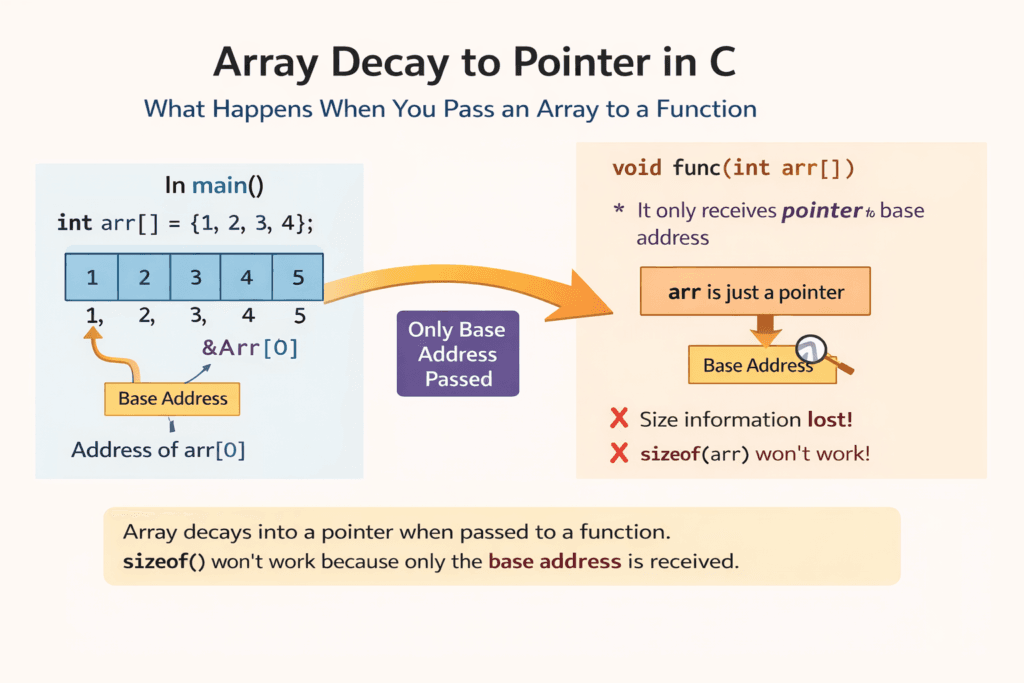
❌ Wrong Approach
void printLength(int arr[]) {
    int len = sizeof(arr) / sizeof(arr[0]); // WRONG
}
✅ Correct Approach: Pass Length as Parameter
#include <stdio.h>

void printLength(int arr[], int size) {
    printf("Length of array: %d\n", size);
}

int main() {
    int arr[] = {1, 2, 3, 4};
    int size = sizeof(arr) / sizeof(arr[0]);

    printLength(arr, size);
    return 0;
}
🔑 Best Practice: Always pass array size explicitly to functions.
Method 3: Using Sentinel Value (Special Cases)
Sometimes arrays end with a special marker value, like -1 or '\0'.
Example
int arr[] = {5, 8, 12, 20, -1};

int length = 0;
while (arr[length] != -1) {
    length++;
}
⚠️ Use carefully: Only works if sentinel value is guaranteed not to appear as real data.
Method 4: Finding Length of a Character Array (String)
C strings are character arrays ending with null character ('\0').
Using strlen()
#include <stdio.h>
#include <string.h>

int main() {
    char name[] = "GangForCode";
    printf("Length: %lu\n", strlen(name));
    return 0;
}
📝 Note: strlen() does not count '\0'.
Common Mistakes to Avoid 🚫
- Using
sizeof()inside functions on arrays - Forgetting to divide by element size
- Assuming C tracks array length automatically
- Not passing array size to functions
Interview Tip 💡
Question: Why does sizeof() fail inside a function?
Answer: Because arrays decay into pointers when passed to functions, losing size information.
Best Practices Summary
| Scenario | Recommended Method |
|---|---|
| Static array | sizeof(arr)/sizeof(arr[0]) |
| Function parameter | Pass size explicitly |
| String | strlen() |
| Special pattern array | Sentinel value |
Code is for execution, not just conversation. I focus on building software that is as efficient as it is logical. At Ganforcode, I deconstruct complex stacks into clean, scalable solutions for developers who care about stability. While others ship bugs, I document the path to 100% uptime and zero-error logic