
Modern AI applications are no longer just chatbots. They need tools, memory, APIs, and structured context. That’s exactly where MCP (Model Context Protocol) comes in.
In this tutorial, you’ll learn what an MCP server is, why it matters, and how to create an mcp server from scratch using Node.js or Python.
What Is an MCP Server?
An MCP server is a backend service that exposes tools, resources, and prompts in a standardized way so that AI models (like Claude or other MCP-compatible LLMs) can interact with your system safely and deterministically.
Instead of giving an LLM direct access to your database or APIs, you expose controlled capabilities through MCP.
MCP Solves These Problems
- ❌ Unstructured prompt hacking
- ❌ Unsafe direct API access
- ❌ Tight coupling between LLMs and backend
- ❌ Hard-to-scale agent tooling
✅ MCP provides:
- Tool discovery
- Typed inputs/outputs
- Secure boundaries
- Plug-and-play AI integrations
MCP Architecture Overview
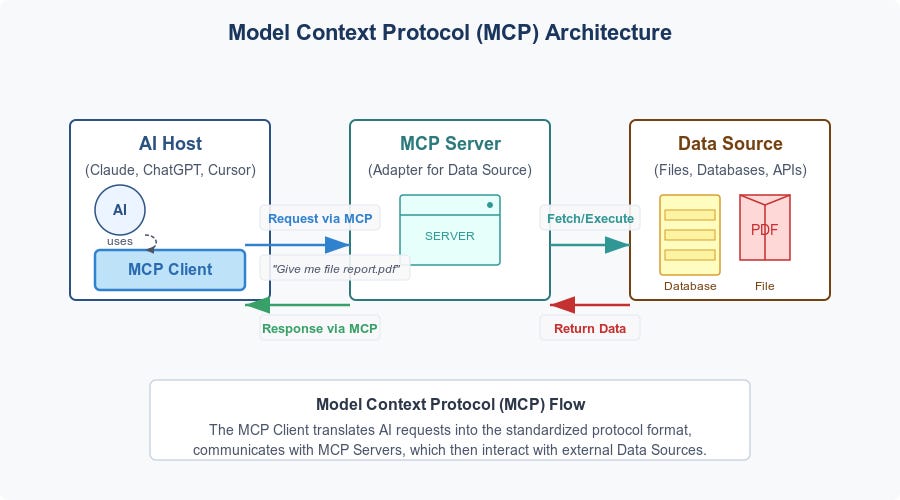

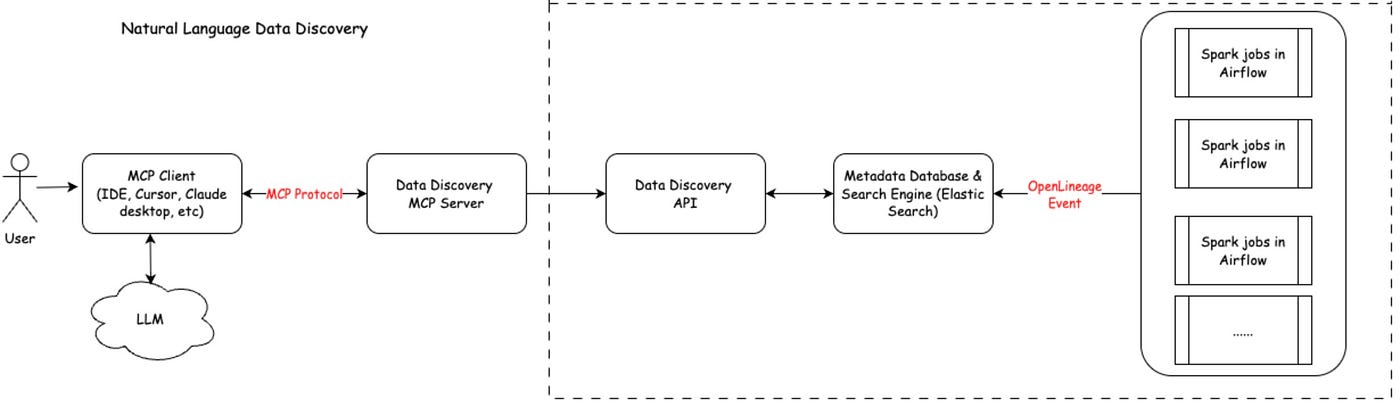
Flow:
- LLM connects to MCP client
- MCP client connects to your MCP server
- Server exposes tools/resources
- LLM calls tools with structured input
- Server responds with typed output
Prerequisites
Before starting, you should know:
- Basic JavaScript or Python
- REST APIs
- JSON & async programming
Tools Needed
- Node.js 18+ or Python 3.10+
- npm / pip
- Terminal
Option 1: Create an MCP Server Using Node.js
Step 1: Initialize the Project
mkdir my-mcp-server
cd my-mcp-server
npm init -y
Step 2: Install MCP SDK
npm install @modelcontextprotocol/sdk zod
Step 3: Create the Server File
Create server.js:
import { Server } from "@modelcontextprotocol/sdk/server/index.js";
import { StdioServerTransport } from "@modelcontextprotocol/sdk/server/stdio.js";
import { z } from "zod";
Step 4: Define the MCP Server
const server = new Server(
  {
    name: "my-first-mcp-server",
    version: "1.0.0",
  },
  {
    capabilities: {
      tools: {},
    },
  }
);
Step 5: Add a Tool
Example: Text to Uppercase Tool
server.tool(
  "toUpperCase",
  {
    text: z.string(),
  },
  async ({ text }) => {
    return {
      content: [
        {
          type: "text",
          text: text.toUpperCase(),
        },
      ],
    };
  }
);
Step 6: Start the MCP Server
const transport = new StdioServerTransport();
await server.connect(transport);
Run it:
node server.js
🎉 Your MCP server is now live.
Option 2: Create an MCP Server Using Python
Step 1: Install Dependencies
pip install mcp pydantic
Step 2: Create the Server
Create server.py:
from mcp.server import Server
from pydantic import BaseModel
Step 3: Define Tool Input Schema
class UpperInput(BaseModel):
    text: str
Step 4: Register Tool
server = Server("python-mcp-server")

@server.tool()
def to_upper_case(input: UpperInput):
    return input.text.upper()
Step 5: Run Server
server.run()
Exposing Resources (Files, Data, APIs)
You can expose read-only resources such as logs, config files, or database views.
Example:
server.resource(
  "config",
  "config://app",
  async () => ({
    contents: [
      {
        uri: "config://app",
        text: JSON.stringify(process.env, null, 2),
      },
    ],
  })
);
MCP Server vs REST API
| Feature | REST API | MCP Server |
|---|---|---|
| AI-safe | ❌ | ✅ |
| Tool discovery | ❌ | ✅ |
| Typed schema | ❌ | ✅ |
| Prompt injection safe | ❌ | ✅ |
| LLM-native | ❌ | ✅ |
Best Practices for MCP Servers
✅ Keep Tools Small
Each tool should do one thing well
✅ Validate All Inputs
Always use schemas (zod / pydantic)
✅ Never Expose Secrets
Use server-side authentication & environment variables
✅ Log Tool Calls
Critical for debugging AI behavior
Real-World Use Cases
- AI agents for DevOps
- Database query assistants
- Code analysis tools
- Internal company copilots
- Secure enterprise chatbots
Common Mistakes to Avoid
❌ Putting business logic in prompts
❌ Returning unstructured text
❌ Overloading one tool with many actions
❌ Allowing unrestricted file access
Final Thoughts
MCP is quickly becoming the standard way to connect AI models with real systems. By building an MCP server, you future-proof your AI applications and gain security, structure, and scalability.
If you already build APIs, learning MCP will feel natural—but far more powerful.
Code is for execution, not just conversation. I focus on building software that is as efficient as it is logical. At Ganforcode, I deconstruct complex stacks into clean, scalable solutions for developers who care about stability. While others ship bugs, I document the path to 100% uptime and zero-error logic