
Microservices architecture has become the backbone of modern, scalable software systems. When combined with the power and maturity of .NET, it provides a robust platform for building cloud-native, enterprise-grade applications.
In this article, you’ll learn what microservices are, why they matter, and how to implement them effectively using .NET, with real-world design considerations.
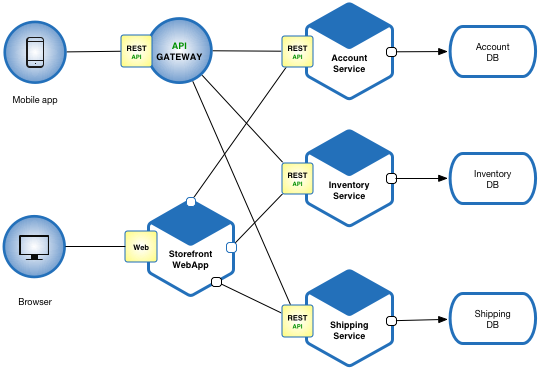
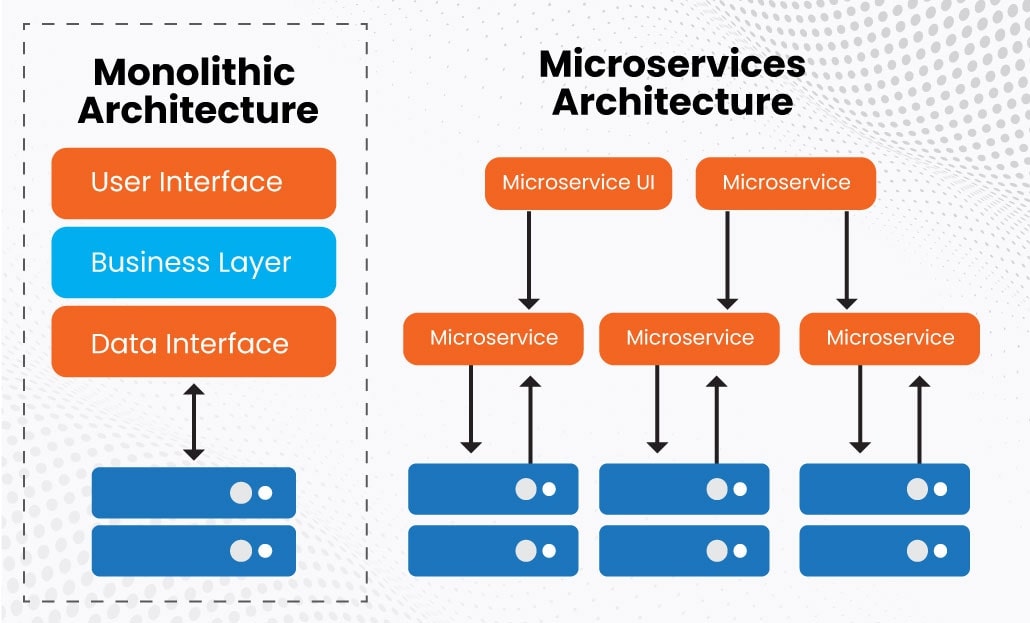
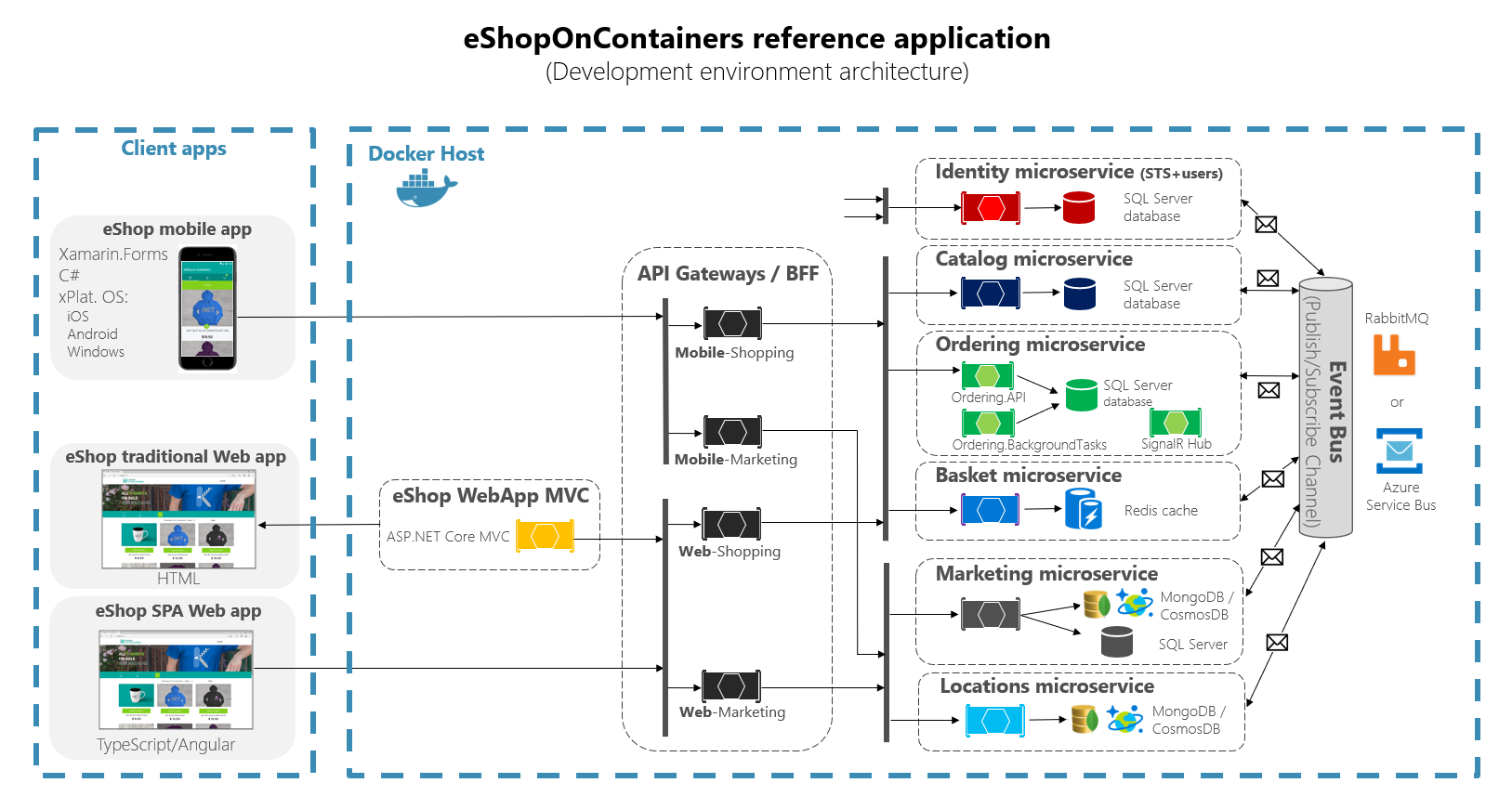
The diagrams below visually explain how microservices architecture is structured and how it differs from traditional monolithic systems. They illustrate service separation, independent deployment units, inter-service communication, and container-based deployment using Docker and Kubernetes. These visuals provide a high-level view of how .NET microservices are organized in real-world systems and how each service operates independently while still working together as a single application.
What Is Microservices Architecture?
Microservices architecture is an approach where an application is broken into small, independent services, each responsible for a specific business capability.
Each microservice:
- Runs as an independent process
- Has its own database
- Can be developed, deployed, and scaled independently
- Communicates with other services via APIs or messaging
This is very different from a monolithic architecture, where all components are tightly coupled and deployed together.
Why Choose Microservices?
Key Benefits
- Independent deployments – Release features faster
- Better scalability – Scale only what you need
- Technology flexibility – Different services can use different tools
- Fault isolation – One service failure won’t crash the entire system
- Improved team autonomy – Teams own specific services
When Microservices Make Sense
Microservices are ideal when:
- You have a large or growing application
- Multiple teams work in parallel
- You need high availability and scalability
- You plan to deploy on the cloud
⚠️ For small applications, microservices may introduce unnecessary complexity.
Why Use .NET for Microservices?
Microsoft has positioned .NET as a first-class platform for cloud-native development.
Advantages of .NET in Microservices
- High performance with ASP.NET Core
- Cross-platform (Linux, Windows, macOS)
- Excellent cloud support (Azure, AWS, GCP)
- Rich ecosystem for APIs, security, messaging, and data
- Long-term support (LTS) releases
Core Components of .NET Microservices Architecture
1. API Layer (ASP.NET Core)
Each microservice is typically built using ASP.NET Core Web API.
Responsibilities:
- Handle HTTP requests
- Validate input
- Return responses (JSON)
- Expose REST or gRPC endpoints
Example:
[ApiController]
[Route("api/orders")]
public class OrdersController : ControllerBase
{
    [HttpGet("{id}")]
    public IActionResult GetOrder(int id)
    {
        return Ok(new { OrderId = id, Status = "Completed" });
    }
}
2. Independent Databases
Each microservice owns its data.
Common choices:
- SQL Server
- PostgreSQL
- MongoDB
- Redis
This avoids tight coupling and enables independent scaling and schema changes.
3. Communication Between Microservices
Synchronous Communication
- REST APIs
- gRPC (high performance)
Use when:
- Immediate response is required
Asynchronous Communication
- Message queues
- Event streaming
Popular tools:
- RabbitMQ
- Azure Service Bus
- Apache Kafka
This improves resilience and decoupling.
4. Service Discovery & API Gateway
API Gateway
Acts as a single entry point:
- Authentication & authorization
- Rate limiting
- Request routing
- Aggregation of responses
Common choices:
- Ocelot (for .NET)
- Azure API Management
- Kong
5. Containerization with Docker
Docker is widely used to package .NET microservices.
Benefits:
- Consistent environments
- Easy deployment
- Lightweight isolation
Typical flow:
.NET App → Docker Image → Container
6. Orchestration with Kubernetes
Kubernetes manages:
- Scaling
- Load balancing
- Self-healing
- Rolling updates
Each microservice runs as a pod, allowing independent scaling.
Security in .NET Microservices
Security must be distributed, not centralized.
Common practices:
- OAuth 2.0 / OpenID Connect
- JWT tokens
- HTTPS everywhere
- Zero-trust communication
Identity providers:
- Azure Active Directory
- Auth0
- IdentityServer
Observability: Logging, Monitoring & Tracing
Microservices require strong observability.
Essential Tools
- Centralized logging (Serilog, ELK)
- Metrics (Prometheus, Azure Monitor)
- Distributed tracing (OpenTelemetry)
Without observability, debugging microservices becomes extremely difficult.
Common Challenges (and How to Handle Them)
| Challenge | Solution |
|---|---|
| Increased complexity | Clear service boundaries |
| Network failures | Retry, circuit breaker (Polly) |
| Data consistency | Eventual consistency |
| Debugging | Centralized logging & tracing |
| Deployment overhead | CI/CD pipelines |
Best Practices for .NET Microservices
✅ Design services around business capabilities
✅ Keep services small and focused
✅ Use asynchronous communication where possible
✅ Automate deployments with CI/CD
✅ Version APIs properly
✅ Embrace event-driven architecture
❌ Avoid shared databases
❌ Avoid chatty service calls
Real-World Use Cases
- E-commerce platforms
- FinTech applications
- Streaming services
- SaaS products
- Large enterprise systems
Many modern systems at scale rely on microservices to handle millions of users daily.
Conclusion
Microservices architecture with .NET offers a powerful, scalable, and enterprise-ready approach to building modern applications. While it introduces complexity, the benefits in scalability, resilience, and development velocity often outweigh the challenges—when implemented correctly.
If you’re building cloud-native, scalable applications, .NET microservices are a strong and future-proof choice.
Code is for execution, not just conversation. I focus on building software that is as efficient as it is logical. At Ganforcode, I deconstruct complex stacks into clean, scalable solutions for developers who care about stability. While others ship bugs, I document the path to 100% uptime and zero-error logic