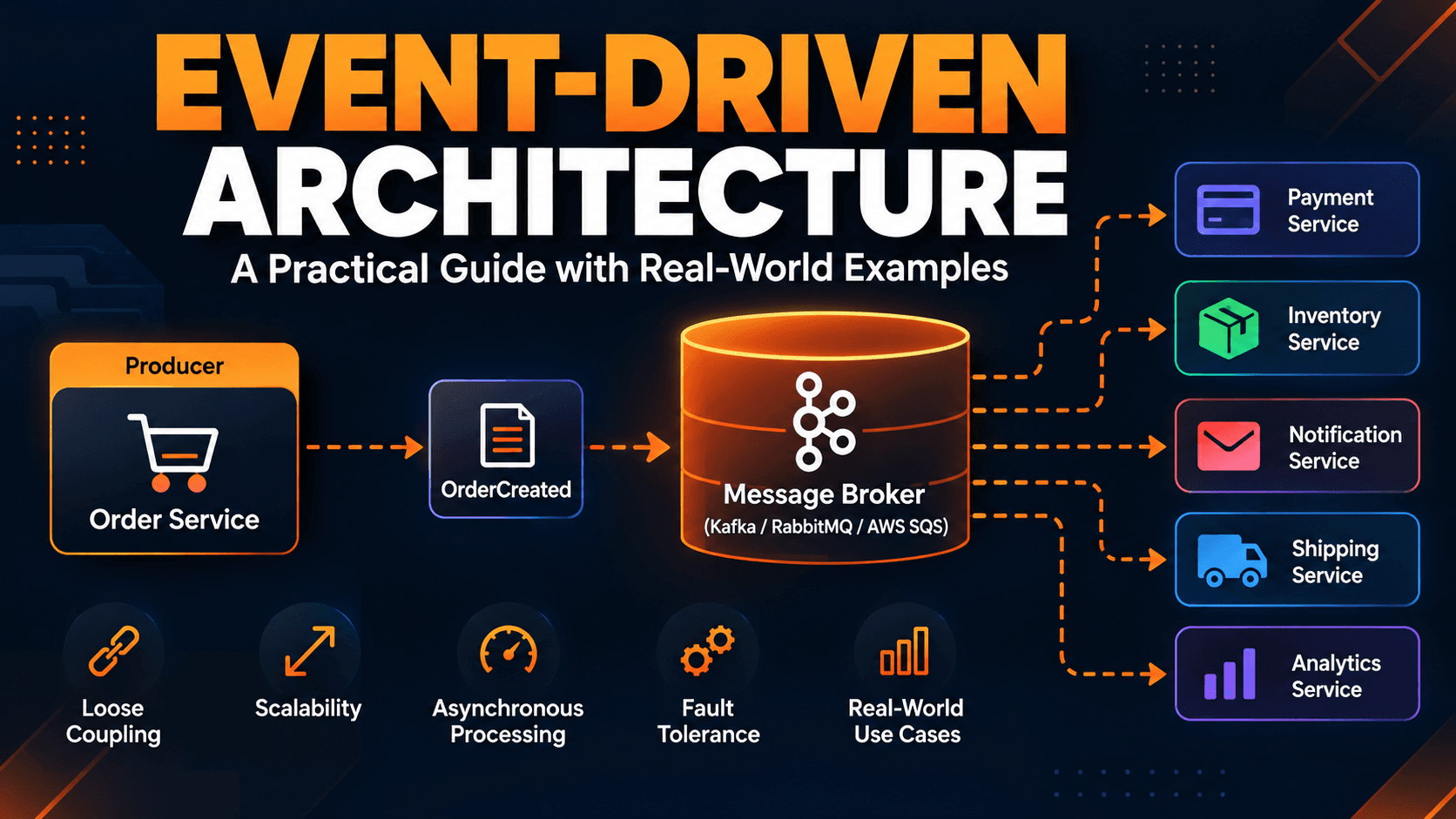
Modern applications rarely work as a single piece of software. A customer places an order, a payment needs to be processed, inventory needs to be updated, an email needs to be sent, analytics need to be recorded, and sometimes a shipment must be created.
If all of these operations are tightly connected, one slow or unavailable service can affect the entire application.
Event-Driven Architecture (EDA) provides a different approach. Instead of services directly calling every other service, a service can publish an event describing something that happened. Other services can independently consume that event and perform their own work.
What Is Event-Driven Architecture?
Event-Driven Architecture is a software architecture style in which application components communicate by producing and consuming events.
An event represents something that has already happened.
OrderCreated
PaymentCompleted
PaymentFailed
ProductReserved
ShipmentCreated
OrderCancelled
A service that performs an action publishes an event. Other interested services subscribe to that event.
Order Service
      |
      | OrderCreated
      v
 Message Broker
   |      |      |
   v      v      v
Payment Inventory Notification
Service  Service  Service
The important idea is that the producer does not necessarily need to know how each consumer processes the event.
Why Use Event-Driven Architecture?
Traditional applications often rely heavily on synchronous communication. An Order Service might directly call Payment, Inventory, Notification, and Shipping services. This creates runtime dependencies and can increase latency.
With an event-driven approach, the Order Service can publish OrderCreated and interested consumers can process it independently.
- Loose coupling
- Better scalability
- Asynchronous processing
- Independent deployment of services
- Better resilience
- Easier integration between systems
- More flexible workflows
EDA also introduces additional complexity around event ordering, duplicate messages, retries, consistency, and monitoring.
Core Components
1. Event Producer
The producer detects that something happened and publishes an event.
2. Event
An event is a record of something that happened.
{
  "eventId": "evt-10001",
  "eventType": "OrderCreated",
  "orderId": "ORD-5001",
  "customerId": "CUS-101",
  "amount": 2499.00,
  "currency": "INR",
  "occurredAt": "2026-09-25T12:30:00Z"
}
3. Event Broker
The broker transports events between producers and consumers. Common technologies include Apache Kafka, RabbitMQ, Amazon EventBridge, Amazon SNS/SQS, Google Pub/Sub, and Azure Service Bus.
4. Event Consumer
A consumer subscribes to events and performs a business operation. Multiple consumers can react to the same event independently.
Real-World Example: E-Commerce Order Processing
Imagine an online shopping application. When a customer purchases a product, the system needs to create the order, process payment, reserve inventory, send a confirmation email, create a shipment, and update analytics.
A tightly coupled design may require the Order Service to coordinate all of these operations. An event-driven design can instead publish OrderCreated.
Customer
   |
   v
Order Service
   |
   | OrderCreated
   v
Kafka / Message Broker
   |
   +----> Payment Service
   +----> Inventory Service
   +----> Notification Service
   +----> Analytics Service
Payment may then publish PaymentCompleted, which can trigger shipping or other downstream workflows.
Step-by-Step Python and Kafka Example
Step 1: Define an Event
from dataclasses import dataclass
from datetime import datetime

@dataclass
class OrderCreatedEvent:
    event_id: str
    order_id: str
    customer_id: str
    amount: float
    occurred_at: datetime
The event represents a fact: an order was created.
Step 2: Publish the Event
import json
from kafka import KafkaProducer

producer = KafkaProducer(
    bootstrap_servers="localhost:9092",
    value_serializer=lambda value: json.dumps(value).encode("utf-8")
)

def publish_order_created(order):
    event = {
        "eventId": order["event_id"],
        "eventType": "OrderCreated",
        "orderId": order["order_id"],
        "customerId": order["customer_id"],
        "amount": order["amount"]
    }

    producer.send("order-events", event)
    producer.flush()
The Order Service does not need to directly call the Payment Service or Notification Service. It publishes an event to the broker.
Step 3: Consume the Event
from kafka import KafkaConsumer
import json

consumer = KafkaConsumer(
    "order-events",
    bootstrap_servers="localhost:9092",
    value_deserializer=lambda value: json.loads(value.decode("utf-8")),
    group_id="payment-service"
)

for message in consumer:
    event = message.value

    if event["eventType"] == "OrderCreated":
        print(f"Processing payment for order {event['orderId']}")
Step 4: Add Another Consumer
consumer = KafkaConsumer(
    "order-events",
    bootstrap_servers="localhost:9092",
    value_deserializer=lambda value: json.loads(value.decode("utf-8")),
    group_id="inventory-service"
)

for message in consumer:
    event = message.value

    if event["eventType"] == "OrderCreated":
        reserve_inventory(event["orderId"])
The same event can now drive multiple independent processes.
Why Consumer Groups Matter
Suppose the Payment Service has three instances. They can belong to the same Kafka consumer group, allowing Kafka to distribute partitions across those instances.
Kafka Topic
     |
     +--- Partition 0 ---> Payment Consumer 1
     +--- Partition 1 ---> Payment Consumer 2
     +--- Partition 2 ---> Payment Consumer 3
Different services can independently consume the same event using different consumer groups.
Event vs Command
An event says that something happened. A command requests that something be done.
Event:   OrderCreated
Command: ReserveInventory
Events are commonly written in the past tense, such as PaymentCompleted or UserRegistered. Commands are instructions such as ProcessPayment or CreateShipment.
Synchronous vs Event-Driven Communication
| Synchronous | Event-Driven |
|---|---|
| Request/response | Event/message based |
| Often immediate response | Usually asynchronous |
| More temporal coupling | Lower temporal coupling |
| Simple initially | More operational complexity |
| Good for immediate results | Good for background workflows |
| Direct service dependency | Broker-mediated communication |
Most production systems use a combination of synchronous and asynchronous communication.
Important Event-Driven Architecture Patterns
Event Notification
The producer tells consumers that something happened. The consumer may retrieve additional information if necessary.
Event-Carried State Transfer
The event contains enough information for a consumer to perform its operation without an additional request for basic information.
Publish/Subscribe
Multiple consumers subscribe to the same event and perform independent operations.
Event Streaming
Events are stored in an ordered stream and consumers process them continuously. Kafka is a common technology for this approach.
Handling Failures
Message delivery does not automatically guarantee successful processing. Consumers need explicit failure-handling strategies.
Retry
Temporary failures can be handled using controlled retries with backoff.
Dead-Letter Queue
Messages that repeatedly fail can be moved to a dead-letter queue for inspection and later remediation.
Idempotency
Consumers should often tolerate duplicate delivery. For example:
def process_payment(event):
    event_id = event["eventId"]

    if already_processed(event_id):
        return

    charge_customer(event)
    mark_as_processed(event_id)
In production, the check and record should be implemented atomically using a reliable persistence mechanism.
The Transactional Outbox Pattern
A common distributed-systems problem occurs when a service updates its database and then publishes an event. If the database update succeeds but publishing fails, other services may never receive the event.
The Transactional Outbox Pattern stores the business change and the event record in the same database transaction. A separate publisher then sends the stored event to the broker.
Database
+----------------+
| Orders         |
| Outbox Events  |
+-------+--------+
        |
        v
  Outbox Publisher
        |
        v
      Kafka
CREATE TABLE outbox_events (
    id VARCHAR(100) PRIMARY KEY,
    event_type VARCHAR(100) NOT NULL,
    aggregate_id VARCHAR(100) NOT NULL,
    payload JSON NOT NULL,
    created_at TIMESTAMP NOT NULL,
    published BOOLEAN DEFAULT FALSE
);
Event Ordering
Some workflows depend on event order. For example:
OrderCreated
PaymentCompleted
OrderShipped
Systems such as Kafka provide ordering within specific boundaries such as a partition. A common design is to use an entity identifier such as orderId as the partition key when events for the same entity need consistent ordering.
Eventual Consistency
Event-driven systems frequently use eventual consistency. After an Order Service creates an order, the Inventory Service may process OrderCreated slightly later. During that interval, the two services may temporarily show different states.
The system becomes consistent after the event is processed.
Production Architecture
Client
  |
  v
API Gateway
  |
  v
Order Service
  |
  | OrderCreated
  v
Apache Kafka
  |
  +------> Payment Service
  |
  +------> Inventory Service
  |
  +------> Notification Service
  |
  +------> Analytics Service
                 |
                 v
          Shipping Workflow
Each service owns its business responsibility, while the event broker provides asynchronous communication.
Observability
Distributed asynchronous systems can be difficult to debug. Production systems should use structured logging, metrics, distributed tracing, consumer-lag monitoring, dead-letter queue monitoring, retry metrics, and event-processing latency metrics.
Useful events should include identifiers that allow logs across services to be connected:
{
  "eventId": "evt-10001",
  "eventType": "OrderCreated",
  "correlationId": "order-flow-5001",
  "orderId": "ORD-5001"
}
Common Mistakes
Using Events for Everything
Not every interaction needs asynchronous messaging. If an immediate response is required, synchronous communication may be simpler.
Creating Huge Events
Avoid putting an entire database object into every event. Include information that consumers actually need.
Ignoring Duplicate Messages
Consumers should be designed around the delivery guarantees of the messaging system rather than assuming perfect exactly-once behavior.
No Retry Strategy
Temporary failures are normal in distributed systems, so consumers need controlled retry behavior.
No Dead-Letter Handling
Some events will continue to fail because of invalid data or application bugs. Dead-letter handling isolates those messages.
Ignoring Schema Evolution
Events are APIs between producers and consumers. Event schemas should evolve carefully and, where possible, in a backward-compatible way.
When Should You Use Event-Driven Architecture?
- Multiple independently deployable services
- Asynchronous workflows
- High-volume event processing
- Multiple consumers for the same business event
- Background processing requirements
- Integration between independent systems
- Independent scaling of consumers
Examples include e-commerce, banking, food delivery, ride-sharing, logistics, and IoT platforms.
When EDA May Not Be Necessary
A small application with only a few components may be easier to build using a conventional backend and database. Adding Kafka, multiple consumers, schema management, retries, and distributed tracing can introduce unnecessary complexity.
Architecture should follow the problem rather than the other way around.
Event-Driven Architecture vs Microservices
Microservices describe how an application is divided into independently deployable services. Event-Driven Architecture describes a communication style based around events.
You can have microservices communicating through REST, microservices communicating through events, or even a monolith using internal events.
Frequently Asked Questions
What is Event-Driven Architecture?
It is a software architecture style where components communicate by producing and consuming events that represent things that happened in the system.
Is Kafka required?
No. Kafka is one technology used for event-driven systems. Other options include RabbitMQ, Amazon EventBridge, Amazon SNS/SQS, Google Pub/Sub, and Azure Service Bus.
What is an example of an event?
OrderCreated, PaymentCompleted, UserRegistered, and ShipmentDispatched are examples.
What is the difference between an event and a command?
An event describes something that happened, while a command requests that something be done. For example, OrderCreated is an event and ReserveInventory is a command.
How do you handle duplicate events?
Use idempotent consumers. A common approach is to record processed event IDs and prevent the same business effect from being applied twice.
What is the Outbox Pattern?
The Outbox Pattern stores an event in the same database transaction as the business change. A separate publisher sends the stored event to the message broker.
Conclusion
Event-Driven Architecture is a powerful approach for building scalable and loosely coupled distributed systems. The basic model is simple: something happens, an event is published, and interested services react.
The production complexity comes from reliability concerns such as idempotency, retries, dead-letter queues, event ordering, eventual consistency, schema evolution, transactional outbox processing, and observability.
For developers working with Java, Spring Boot, Python, FastAPI, Kafka, and microservices, understanding these concepts provides a strong foundation for designing modern distributed systems.