
Large Language Models (LLMs) like GPT and Gemini are powerful, but building reliable, multi-step AI applications with them is not trivial. As projects grow beyond simple prompts, developers face challenges like managing state, controlling execution flow, handling retries, and coordinating multiple AI components.
This is where LangGraph comes in.
In this beginner-friendly guide, you’ll learn:
- What problem LangGraph solves
- The difference between chains, agents, and graphs
- Real-world use cases of LangGraph
- How LangGraph fits into the LangChain ecosystem
What Is LangGraph?
graph LR
    subgraph Traditional["❌ Traditional Linear Approach"]
        L1[Step 1] --> L2[Step 2] --> L3[Step 3] --> L4[Step 4]
    end

    subgraph LangGraph["✓ LangGraph Graph-Based Approach"]
        direction TB
        N1[Task Node]
        N2[Decision Node]
        N3[Action Node]
        N4[Memory Node]

        N1 --> N2
        N2 -->|Branch A| N3
        N2 -->|Branch B| N4
        N3 -->|Loop| N1
        N4 --> End([Complete])

        Memory[("Stateful Memory")]
        Memory -.->|Context| N1
        Memory -.->|Context| N2
        Memory -.->|Context| N3
        Memory -.->|Context| N4
    end

    subgraph UseCases["Ideal For"]
        UC1[🤖 Autonomous Agents]
        UC2[📋 Multi-Step Planners]
        UC3[🧠 Reasoning Pipelines]
    end

    Traditional -.->|Upgrade to| LangGraph
    LangGraph -.->|Powers| UseCases

    style Traditional fill:#ffebee,stroke:#c62828,stroke-width:2px
    style LangGraph fill:#e8f5e9,stroke:#2e7d32,stroke-width:3px
    style Memory fill:#e1f5ff,stroke:#0288d1,stroke-width:2px
    style UseCases fill:#fff3e0,stroke:#f57c00,stroke-width:2px
    style N2 fill:#f3e5f5,stroke:#7b1fa2,stroke-width:2px
LangGraph is a framework for building stateful, graph-based workflows for LLM-powered applications. Instead of executing steps in a fixed linear order, LangGraph lets you define your application as a graph of nodes, where each node performs a task and edges define how data and control flow between them.
Think of it as:
A way to design AI workflows like flowcharts—but with memory, branching, and looping.
This makes LangGraph ideal for complex AI systems such as autonomous agents, planners, and multi-step reasoning pipelines.
What Problem Does LangGraph Solve?
Before LangGraph, most LLM apps relied on:
- Simple prompt calls, or
- Linear chains of steps
These approaches break down when applications need:
- Conditional logic (if/else decisions)
- Iteration (retry, loop until success)
- Persistent memory across steps
- Multiple agents collaborating
- Human-in-the-loop checkpoints
Common Problems Without LangGraph
- Hard-to-debug spaghetti logic
- Manual state handling
- Poor control over execution paths
- Unreliable long-running workflows
LangGraph addresses these issues by introducing explicit structure and state management.
Chains vs Agents vs Graphs (Explained Simply)
Understanding LangGraph starts with understanding how it differs from chains and agents.
1. Chains
Chains are linear pipelines.
Example:
Prompt → LLM → Output
Pros
- Simple
- Easy to understand
Cons
- No branching
- No loops
- Limited flexibility
👉 Best for simple tasks like text summarization or translation.
2. Agents
Agents decide what to do next based on the model’s reasoning.
Example:
LLM → Choose tool → Observe result → Decide next step
Pros
- Dynamic behavior
- Tool usage
Cons
- Less predictable
- Harder to debug
- Control logic is implicit
👉 Best for exploratory or autonomous tasks.
3. Graphs (LangGraph)
Graphs explicitly define every step and decision path.
Example:
Node A → Node B → (Condition) → Node C or Node D → Loop → End
Pros
- Full control over execution
- Explicit state handling
- Supports loops and branching
- Easier debugging
👉 Best for production-grade AI workflows.
Key Concepts in LangGraph
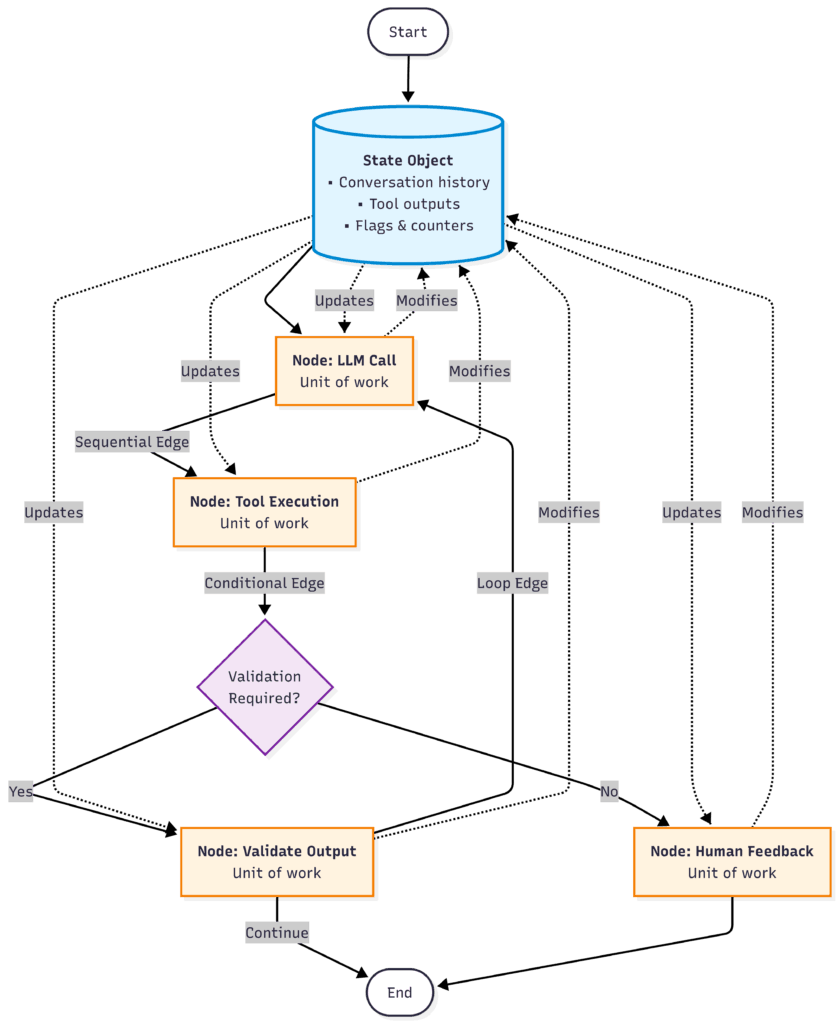
Nodes
Each node in the diagram represents a specific unit of work in the LangGraph execution flow:
- LLM Call – Invokes the language model to generate responses
- Tool Execution – Runs external tools or functions
- Validate Output – Checks and verifies the results
- Human Feedback – Incorporates human-in-the-loop validation
Edges
Edges illustrate how execution flows between nodes:
- Sequential paths – Direct progression from LLM Call → Tool Execution
- Conditional branches – Decision point that routes to either Validate Output or Human Feedback based on validation requirements
- Loop edges – Feedback loop from Validate Output back to LLM Call for iterative refinement
State
The central State Object (shown in blue) maintains shared data throughout execution:
- Conversation history
- Tool outputs
- Flags and counters
Notice the dotted lines showing how state is passed to each node and updated as the graph executes, ensuring all components have access to the current context.
Real-World Use Cases of LangGraph
1. Advanced Chatbots
LangGraph enables chatbots that:
- Maintain long-term context
- Switch between modes (Q&A, search, reasoning)
- Escalate to humans when needed
Example:
Customer support bots with verification, resolution, and feedback loops.
2. AI Planners & Task Decomposition
LangGraph is perfect for:
- Breaking a goal into steps
- Executing steps iteratively
- Revising plans based on outcomes
Example:
“Plan a trip” → research → compare → budget → finalize itinerary.
3. Autonomous & Semi-Autonomous Agents
Build agents that:
- Use multiple tools
- Retry failed actions
- Stop based on defined rules
Example:
An agent that writes code, runs tests, fixes errors, and re-runs until success.
4. Enterprise AI Workflows
LangGraph shines in:
- Compliance-heavy systems
- Approval pipelines
- Human-in-the-loop reviews
Example:
Document analysis → risk detection → human approval → final report.
How LangGraph Fits into the LangChain Ecosystem
LangGraph is not a replacement for LangChain—it’s an extension.
How They Work Together
- LangChain provides:
- LLM wrappers
- Prompt templates
- Tools and integrations
- LangGraph provides:
- Execution control
- State management
- Workflow structure
Simple Analogy
- LangChain = building blocks
- LangGraph = blueprint & control system
You can reuse:
- LangChain prompts
- LangChain tools
- LangChain memory
inside LangGraph nodes.
When Should You Use LangGraph?
Use LangGraph if your application:
- Needs branching or looping logic
- Involves multiple steps or agents
- Requires predictable behavior
- Must handle long-running workflows
- Needs production-grade reliability
Avoid LangGraph if:
- Your app is just a single prompt
- A simple chain solves your problem
Final Thoughts
LangGraph represents a shift from prompt hacking to structured AI engineering. By modeling workflows as graphs, it brings clarity, reliability, and scalability to LLM-powered systems.
If you’re serious about building real-world AI applications, learning LangGraph is a natural next step after LangChain.
👉 In the next tutorial, you can dive into LangGraph architecture and core components to start building your first graph-based LLM workflow.
Code is for execution, not just conversation. I focus on building software that is as efficient as it is logical. At Ganforcode, I deconstruct complex stacks into clean, scalable solutions for developers who care about stability. While others ship bugs, I document the path to 100% uptime and zero-error logic
5 thoughts on “What Is LangGraph? A Beginner’s Guide to Graph-Based LLM Workflows”