When building Python applications, you may eventually encounter tasks that take a significant amount of time to complete. Running these tasks one after another can make your application slow and inefficient.
Python provides several ways to execute multiple tasks concurrently. Two of the most commonly used approaches are multithreading and multiprocessing. This topic also fits into a broader AI/ML learning roadmap, where Python concurrency becomes useful for data processing and model workflows.
Although both techniques allow multiple tasks to make progress at the same time, they work very differently.
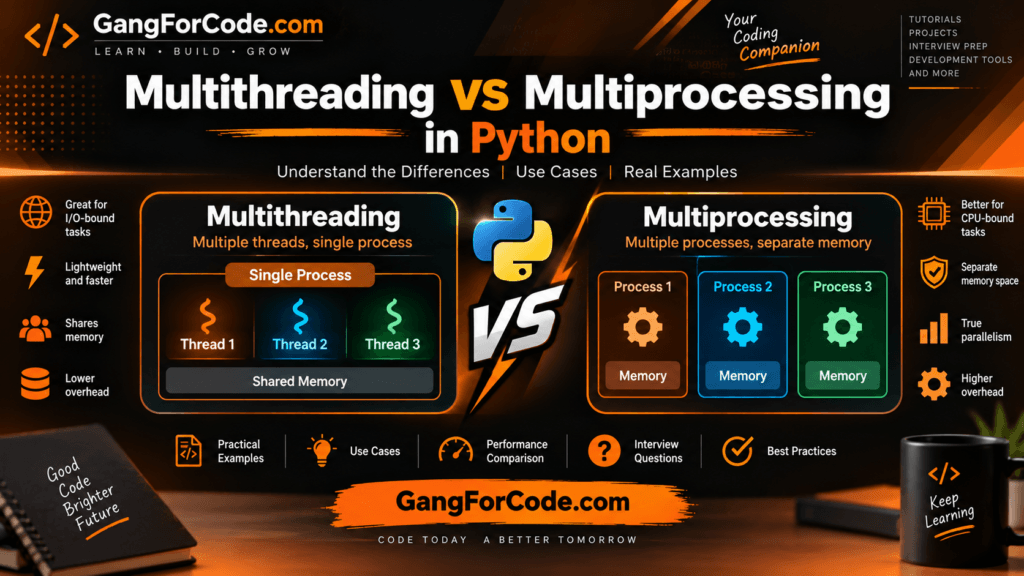
In this tutorial, we will understand:
- What multithreading is in Python
- What multiprocessing is in Python
- The difference between threads and processes
- How Python’s GIL affects multithreading
- When to use multithreading
- When to use multiprocessing
- Practical Python examples
- Performance considerations
- Thread safety and process communication
- Common interview questions
Table of Contents
What Is Concurrency?
Before understanding multithreading and multiprocessing, it is important to understand concurrency.
Concurrency means dealing with multiple tasks during the same period of time.
For example, imagine a Python application that needs to:
- Download a file
- Call an API
- Read data from a database
- Process a user request
Instead of waiting for each operation to completely finish before starting the next one, the application can allow other tasks to make progress while one task is waiting.
This can significantly improve application responsiveness and resource utilization.
Concurrency is especially useful for operations involving waiting, such as:
- Network requests
- File operations
- Database queries
- API calls
- Web scraping
- Reading and writing files
What Is Parallelism?
Parallelism is slightly different from concurrency.
Parallelism means executing multiple tasks literally at the same time, usually on multiple CPU cores.
For example, if a computer has four CPU cores, four CPU-intensive tasks may potentially execute simultaneously on four cores.
A simple way to remember the distinction is:
Concurrency: Multiple tasks are being managed at the same time.
Parallelism: Multiple tasks are actually executing simultaneously.
Multithreading and multiprocessing can both be used for concurrent programming, but multiprocessing is particularly useful for achieving CPU-level parallelism in Python.
What Is Multithreading in Python?
Multithreading means running multiple threads within the same process.
A thread is a lightweight unit of execution.
A Python process can contain multiple threads, and these threads generally share the same memory space.
Python provides the built-in threading module for working with threads.
Simple Multithreading Example
import threading
import time


def task(name):
    print(f"Starting {name}")
    time.sleep(2)
    print(f"Finished {name}")


thread1 = threading.Thread(target=task, args=("Task 1",))
thread2 = threading.Thread(target=task, args=("Task 2",))

thread1.start()
thread2.start()

thread1.join()
thread2.join()

print("All tasks completed")
Here, two threads are created.
thread1 = threading.Thread(...)
thread2 = threading.Thread(...)
The start() method begins execution:
thread1.start()
thread2.start()
The join() method makes the main thread wait until the worker threads finish:
thread1.join()
thread2.join()
Because both tasks spend most of their time sleeping, the program can make progress on both tasks concurrently.
Why Use Multithreading?
Multithreading is particularly useful when your application spends a lot of time waiting for external operations.
For example:
Python application
       |
       +---- Thread 1 ---> API request
       |
       +---- Thread 2 ---> Database query
       |
       +---- Thread 3 ---> File operation
While Thread 1 waits for the API response, another thread can perform useful work.
Typical use cases include:
- Downloading multiple files
- Calling multiple APIs
- Web scraping
- Network programming
- Database operations
- File I/O
- Sending emails
- Background I/O operations
What Is Multiprocessing in Python?
Multiprocessing means running multiple processes.
Unlike threads, processes have separate memory spaces.
Python provides the built-in multiprocessing module for creating and managing processes.
A process can execute independently from other processes and can run on a separate CPU core.
Simple Multiprocessing Example
from multiprocessing import Process
import time


def task(name):
    print(f"Starting {name}")
    time.sleep(2)
    print(f"Finished {name}")


process1 = Process(target=task, args=("Process 1",))
process2 = Process(target=task, args=("Process 2",))

process1.start()
process2.start()

process1.join()
process2.join()

print("All processes completed")
The structure looks similar to multithreading.
The important difference is that we create Process objects instead of Thread objects.
Process(target=task, ...)
Each process has its own Python interpreter and memory space.
Multithreading vs Multiprocessing
The biggest difference is the unit of execution.
| Feature | Multithreading | Multiprocessing |
|---|---|---|
| Unit of execution | Thread | Process |
| Memory | Shared within process | Separate |
| CPU parallelism | Limited by CPython GIL for Python bytecode | Yes |
| Communication | Relatively easy | Requires IPC/mechanisms |
| Resource usage | Lower | Higher |
| Creation overhead | Lower | Higher |
| Best suited for | I/O-bound tasks | CPU-bound tasks |
| Memory isolation | Low | High |
| Failure isolation | Lower | Higher |
| Complexity | Usually simpler | Usually more complex |
The Python GIL
One of the most important concepts when discussing Python multithreading is the Global Interpreter Lock, commonly called the GIL.
In standard CPython implementations, the GIL historically prevents multiple threads from executing Python bytecode simultaneously within the same interpreter.
This means that simply creating multiple threads does not necessarily make CPU-intensive Python code execute in parallel.
For example:
def calculate():
    total = 0

    for i in range(10_000_000):
        total += i

    return total
This is a CPU-bound operation.
Using multiple threads for pure Python CPU work may not provide the expected performance improvement because of the GIL.
Multiprocessing can instead use separate Python processes, allowing CPU-bound work to execute across multiple CPU cores.
I/O-Bound vs CPU-Bound Tasks
Understanding whether your task is I/O-bound or CPU-bound is one of the easiest ways to decide between threads and processes.
I/O-Bound Tasks
An I/O-bound task spends much of its time waiting for external resources.
Examples:
- HTTP requests
- Database queries
- File operations
- Network communication
- Waiting for external services
For example:
response = requests.get("https://example.com")
The CPU isn’t necessarily doing useful computation during the entire operation. The program may spend time waiting for the network.
Multithreading can be useful in this situation.
CPU-Bound Tasks
A CPU-bound task spends most of its time performing computations.
Examples include:
- Image processing
- Large mathematical calculations
- Data transformations
- Compression
- Cryptographic calculations
- Some machine learning preprocessing
For CPU-heavy Python code, multiprocessing can provide better parallelism.
Multithreading Example for I/O-Bound Work
Suppose we need to download several web pages.
A sequential implementation might look like:
import requests


urls = [
    "https://example.com",
    "https://example.org",
    "https://example.net",
]


for url in urls:
    response = requests.get(url)
    print(url, response.status_code)
Each request must finish before the next request starts.
Using threads:
import requests
from concurrent.futures import ThreadPoolExecutor


urls = [
    "https://example.com",
    "https://example.org",
    "https://example.net",
]


def fetch(url):
    response = requests.get(url)
    return url, response.status_code


with ThreadPoolExecutor(max_workers=3) as executor:
    results = executor.map(fetch, urls)


for result in results:
    print(result)
ThreadPoolExecutor manages a pool of worker threads for us.
Instead of manually creating threads, this approach is often cleaner for common parallel task execution.
Why ThreadPoolExecutor Is Useful
Python’s concurrent.futures module provides high-level APIs for concurrent execution.
For threads:
ThreadPoolExecutor
For processes:
ProcessPoolExecutor
This means you can often switch between threading and multiprocessing while keeping a similar programming model.
Multiprocessing Example for CPU-Bound Work
Consider a CPU-intensive calculation:
def calculate(number):
    total = 0

    for i in range(number):
        total += i * i

    return total
We can use ProcessPoolExecutor:
from concurrent.futures import ProcessPoolExecutor


numbers = [
    10_000_000,
    20_000_000,
    30_000_000,
    40_000_000,
]


def calculate(number):
    total = 0

    for i in range(number):
        total += i * i

    return total


if __name__ == "__main__":
    with ProcessPoolExecutor() as executor:
        results = executor.map(calculate, numbers)

    for result in results:
        print(result)
The tasks can be distributed among multiple processes.
The if __name__ == "__main__": guard is particularly important when using multiprocessing, especially on platforms that use the spawn method to create child processes.
Threads Share Memory
Threads inside the same process share the process’s memory.
For example:
import threading


counter = 0


def increment():
    global counter

    for _ in range(100000):
        counter += 1


thread1 = threading.Thread(target=increment)
thread2 = threading.Thread(target=increment)

thread1.start()
thread2.start()

thread1.join()
thread2.join()

print(counter)
When multiple threads access and modify shared state, synchronization may be necessary.
Race Conditions
A race condition occurs when multiple threads access shared data concurrently and the final result depends on the timing of their execution.
For example:
Thread 1 ---> read value
Thread 2 ---> read value
Thread 1 ---> modify value
Thread 2 ---> modify value
Both threads may operate on the same data unexpectedly.
This is why shared mutable state should be handled carefully.
Using a Lock
Python provides Lock for protecting critical sections.
import threading


counter = 0
lock = threading.Lock()


def increment():
    global counter

    for _ in range(100000):
        with lock:
            counter += 1


thread1 = threading.Thread(target=increment)
thread2 = threading.Thread(target=increment)

thread1.start()
thread2.start()

thread1.join()
thread2.join()

print(counter)
The lock ensures that only one thread at a time enters the protected section.
with lock:
    counter += 1
This is an example of synchronization.
Processes Have Separate Memory
Processes do not normally share ordinary Python variables.
Consider:
from multiprocessing import Process


counter = 0


def increment():
    global counter
    counter += 1


if __name__ == "__main__":
    process = Process(target=increment)

    process.start()
    process.join()

    print(counter)
You should not expect the child process’s modification to automatically update the parent’s counter.
The processes have separate memory spaces.
This separation provides isolation but also means that communication requires explicit mechanisms.
Inter-Process Communication
Python provides several mechanisms for communication between processes.
Common options include:
QueuePipeValueArrayManager- Shared memory
For example, using a queue:
from multiprocessing import Process, Queue


def worker(queue):
    queue.put("Task completed")


if __name__ == "__main__":
    queue = Queue()

    process = Process(target=worker, args=(queue,))

    process.start()

    print(queue.get())

    process.join()
The worker process places a message into the queue, and the parent process retrieves it.
Thread vs Process Memory Model
A useful mental model is:
Multithreading

Process
│
├── Thread 1
├── Thread 2
└── Thread 3

Shared memory
Whereas multiprocessing looks more like:
Process 1
└── Private memory

Process 2
└── Private memory

Process 3
└── Private memory
This difference has a major impact on application design.
Performance Considerations
It is tempting to assume that multiprocessing is always faster because it can use multiple CPU cores.
That is not necessarily true.
Processes have additional overhead.
Creating processes, communicating between them, and transferring data can be expensive.
Similarly, creating a large number of threads is not free.
Therefore, the goal is not simply to maximize the number of threads or processes.
Instead, choose the concurrency model based on the workload.
When Should You Use Multithreading?
Consider multithreading when:
- Your tasks are primarily I/O-bound.
- You perform many network requests.
- You communicate with external APIs.
- You perform file operations.
- You need lightweight concurrent workers.
- Tasks spend significant time waiting.
Example:
Web Scraper
     |
     +-- Thread 1 ---> Website A
     +-- Thread 2 ---> Website B
     +-- Thread 3 ---> Website C
     +-- Thread 4 ---> Website D
When Should You Use Multiprocessing?
Consider multiprocessing when:
- Your workload is CPU-bound.
- You need to perform expensive calculations.
- You want to utilize multiple CPU cores.
- Tasks can be divided into relatively independent units.
- Process isolation is useful.
Example:
CPU-intensive workload
          |
   +------+------+
   |      |      |
Process Process Process
   1      2      3
   |      |      |
 Core 1  Core 2  Core 3
Multithreading vs Multiprocessing: Practical Decision
A simple decision tree is:
             What type of work?
                    |
             +------+------+
             |             |
           I/O-bound     CPU-bound
             |             |
       Multithreading   Multiprocessing
However, this is a rule of thumb rather than an absolute law.
The actual choice depends on:
- Workload characteristics
- Python implementation
- Libraries being used
- Number of tasks
- Task duration
- Communication requirements
- Memory requirements
- Deployment environment
What About AsyncIO?
Python also provides asynchronous programming through asyncio.
This is another important approach for I/O-bound applications.
For example:
import asyncio


async def task(name):
    print(f"Starting {name}")
    await asyncio.sleep(2)
    print(f"Finished {name}")


async def main():
    await asyncio.gather(
        task("Task 1"),
        task("Task 2"),
        task("Task 3"),
    )


asyncio.run(main())
Here, asynchronous tasks can make progress while waiting for I/O.
For applications that perform large numbers of concurrent network operations, asynchronous programming can be an important alternative to traditional threads.
Multithreading vs AsyncIO
The two approaches are not identical.
Multithreading
Uses operating-system or Python-managed threads.
Thread 1
Thread 2
Thread 3
AsyncIO
Usually uses a single thread with an event loop that coordinates asynchronous tasks.
Event Loop
   |
   +-- Task 1
   +-- Task 2
   +-- Task 3
For high-concurrency I/O applications, asyncio can be particularly useful when the libraries involved support asynchronous APIs.
Multithreading vs Multiprocessing vs AsyncIO
| Feature | Multithreading | Multiprocessing | AsyncIO |
|---|---|---|---|
| Main abstraction | Threads | Processes | Coroutines |
| CPU parallelism | Limited for Python bytecode under the traditional CPython GIL model | Yes | No |
| I/O concurrency | Good | Possible | Excellent for supported async I/O |
| CPU-bound work | Usually not ideal | Good | Usually not ideal |
| Memory | Shared within process | Separate | Shared within event-loop thread |
| Overhead | Moderate | Higher | Low |
| Programming style | Synchronous/concurrent | Parallel | Asynchronous |
| Common use | I/O tasks | CPU-heavy tasks | High-concurrency I/O |
Important Note About Modern Python
The GIL discussion requires some nuance.
Python’s traditional CPython implementation has historically used the Global Interpreter Lock, which limits simultaneous execution of Python bytecode by threads within a single interpreter.
However, Python’s ecosystem is evolving, including support for free-threaded CPython builds in newer Python releases.
Therefore, the statement that “Python threads can never run CPU-bound code in parallel” is too absolute.
For a specific Python version and deployment, check whether you are using a free-threaded build and whether your dependencies support that execution model.
For traditional CPython deployments, the I/O-bound-versus-CPU-bound rule remains a useful practical guideline.
Multithreading in Web Applications
Multithreading can be useful in web applications when performing blocking I/O operations.
For example, an application might need to:
Incoming Request
       |
       +---- API Call
       |
       +---- Database Query
       |
       +---- File Operation
However, web frameworks such as FastAPI also support asynchronous programming.
If your application uses asynchronous endpoints and async-compatible libraries, asyncio may be a better fit than creating threads manually for every I/O operation.
Multiprocessing in Data Processing
Suppose you need to process thousands of independent data records where each record requires expensive computation.
You can divide the workload:
10,000 records
      |
      +---- Process 1 ---> Records 1-2500
      +---- Process 2 ---> Records 2501-5000
      +---- Process 3 ---> Records 5001-7500
      +---- Process 4 ---> Records 7501-10000
This allows CPU-intensive work to be distributed across multiple processes.
Common Mistakes
1. Using Threads for Every Problem
Creating multiple threads does not automatically make a program faster.
For CPU-heavy Python code under traditional CPython execution, the GIL can limit the benefit.
2. Creating Too Many Processes
More processes do not always mean better performance.
If you create hundreds of processes for a small workload, process-management overhead can outweigh the benefits.
3. Ignoring Shared State
Multiple threads modifying the same data can introduce race conditions.
Use synchronization mechanisms when shared mutable state is unavoidable.
4. Ignoring Process Communication Costs
Processes have separate memory.
Moving large amounts of data between processes can be expensive.
5. Forgetting the Main Guard
When using multiprocessing, especially with the spawn start method, structure your entry point carefully:
if __name__ == "__main__":
    main()
How to Choose Between Threads and Processes
Ask yourself these questions:
Question 1: Is the task I/O-bound?
If yes, consider:
- Multithreading
- AsyncIO
Question 2: Is the task CPU-bound?
If yes, consider:
- Multiprocessing
- Process pools
- Specialized native libraries
Question 3: Do workers need lots of shared mutable state?
If yes, threads may be simpler from a memory-sharing perspective, but synchronization becomes important.
Question 4: Does the workload require process isolation?
If yes, multiprocessing may be more appropriate.
Question 5: Does the application need thousands of concurrent I/O operations?
Consider asynchronous programming with asyncio and async-compatible libraries.
Quick Example
Suppose you are building an application that processes 1,000 URLs.
The workload is mostly:
Send request
     ↓
Wait
     ↓
Receive response
     ↓
Store result
This is primarily I/O-bound.
A thread pool or asynchronous programming may be appropriate.
Now consider an application that needs to perform expensive image transformations:
Load image
    ↓
Resize
    ↓
Apply transformations
    ↓
Encode
If the workload is CPU-intensive and the operations are implemented in Python, multiprocessing may be more appropriate.
Frequently Asked Interview Questions
1. What is the difference between multithreading and multiprocessing in Python?
Multithreading uses multiple threads within a process and shares memory, while multiprocessing uses separate processes with independent memory spaces.
2. Why is multiprocessing useful for CPU-bound tasks?
Separate processes can execute on different CPU cores and avoid the traditional CPython GIL limitation that applies to Python bytecode execution within a single interpreter.
3. What is the GIL?
The Global Interpreter Lock is a mechanism in traditional CPython that allows only one thread at a time to execute Python bytecode within a given interpreter.
4. When should you use multithreading?
Multithreading is commonly useful for I/O-bound workloads such as network requests, file operations, and blocking external services.
5. When should you use multiprocessing?
Multiprocessing is commonly useful for CPU-intensive workloads that can be divided into independent tasks.
6. Do threads share memory?
Threads belonging to the same process share the process’s memory.
7. Do processes share memory?
Normally, separate processes have separate memory spaces. Explicit mechanisms are required when they need to communicate or share data.
8. What is a race condition?
A race condition occurs when concurrent operations access shared state and the result depends on their execution timing.
9. What is ThreadPoolExecutor?
ThreadPoolExecutor is a high-level API from concurrent.futures that manages a pool of threads for executing tasks concurrently.
10. What is ProcessPoolExecutor?
ProcessPoolExecutor is a high-level API from concurrent.futures that distributes tasks across a pool of processes.
Final Summary
Multithreading and multiprocessing solve related but different problems.
Multithreading is generally useful when tasks spend a significant amount of time waiting for I/O.
Multiprocessing is generally useful when tasks require substantial CPU computation and can be divided across independent processes.
A practical rule is:
I/O-bound
   ↓
Threads / AsyncIO

CPU-bound
   ↓
Processes
But this should be treated as a starting point rather than a universal rule. The best approach depends on the Python implementation, libraries, workload, communication requirements, and deployment environment.
Understanding these differences is particularly important when building high-performance Python applications, APIs, data-processing systems, automation tools, and backend services.
Once you understand threads, processes, the GIL, synchronization, and asynchronous programming, you have a much stronger foundation for designing concurrent Python applications.
1 thought on “Multithreading vs Multiprocessing in Python: Complete Guide”